
Blog Resume Help Double Major on Resume
How to List a Double Major on a Resume
 Written By Ida PetterssonCareer Coach and Resume Expert
 Reviewed By Geoffrey ScottSenior Hiring Manager & Career Coach
Committed to empowering job seekers of all experience levels to take the next step in their careers, Ida helps professionals navigate the job hunt from start to finish. After graduating...

- 1. Decide where your education section should go
- 2. Add your degree first, unless you went to a well-known college or university
- 3. List your most relevant major first
- 4. Add any minors
- 5. Include your GPA if it’s high
- 6. List any coursework relevant to the job
- 7. Add your senior thesis
- 8. Add your double major to your LinkedIn profile
- Additional resources

Struggling to get interviews?
Graduating from college with a double major is an achievement worth showcasing on your resume. But you need to know how to list your education properly.
A double major is a single degree that indicates two areas of specialization. You can pursue a double major in:
- similar fields, such as Economics and Finance
- fields that are less obviously related, such as Biology and English Literature
If your fields are unrelated, your primary major defines the type of degree you receive (for example BA vs BSc).
Let’s go over how to put your double major on your resume.
1. Decide where your education section should go
How prominent the education section of your resume should be depends on how far into your career you are.
If you’re writing a recent college graduate, use a template like the Harvard resume format where the education section is placed at the top.
Alternatively, if you’ve already held numerous jobs and graduated many years ago, your education section should come after your work history.
2. Add your degree first, unless you went to a well-known college or university
When adding an entry to your education section, your degree title should be the first line, like this:
Bachelor of Science
Physics and Mathematics – Double major
College of Eastern Idaho. Idaho Falls, ID
June 2023
However, if you went to a prestigious institution (such as an Ivy League school), highlight this achievement by listing the institution first. Here’s an example:
Stanford University, Stanford, CA
Bachelor of Science in Physics and Mathematics – Double major
June 2023
3. List your most relevant major first
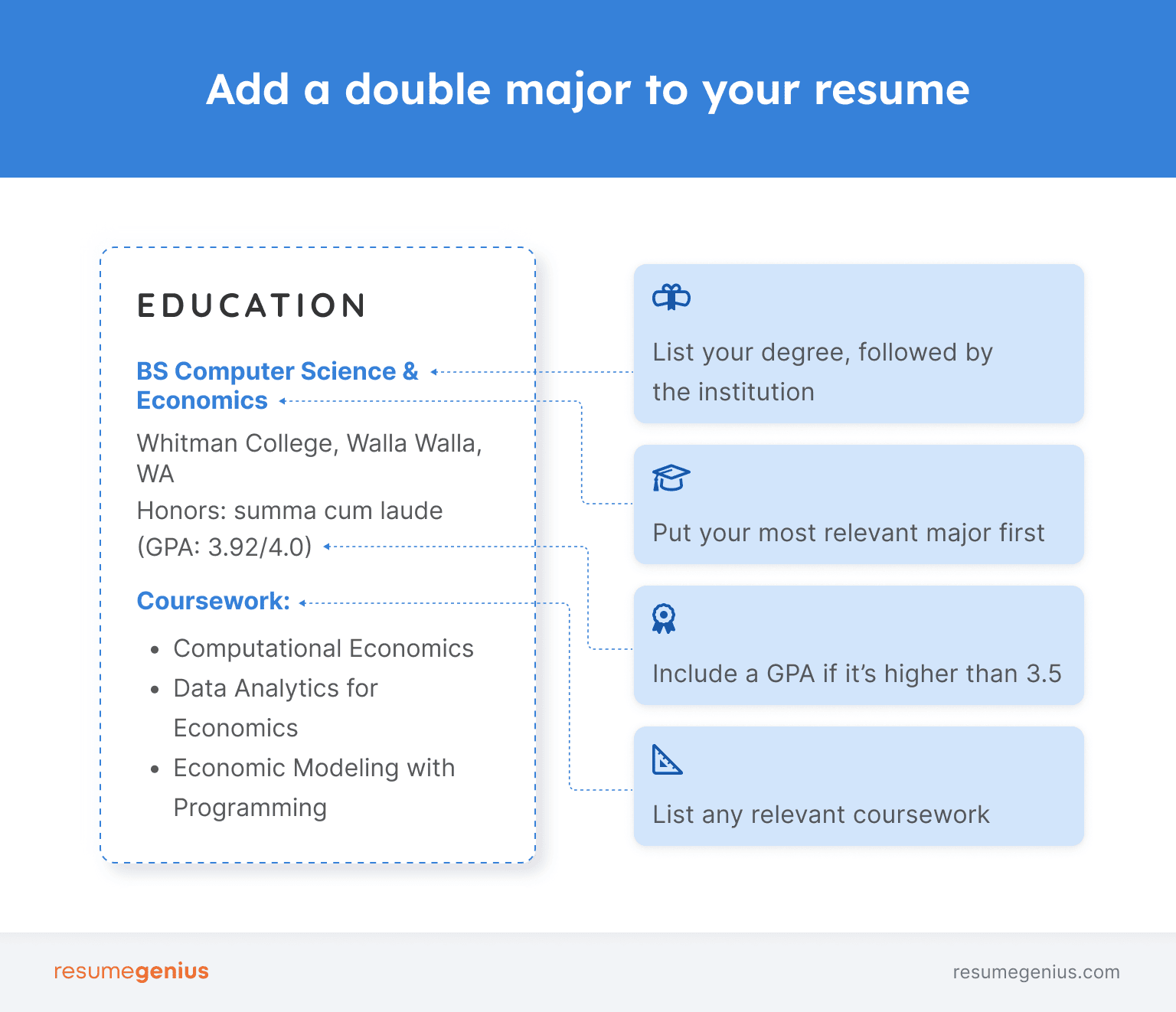
Consider which of your majors is more relevant to the job you’re applying for, and list that major first. If you’re applying to a variety of positions, tailor your resume to each position.
For instance, if you graduated with a double major in creative writing and Spanish, list creative writing first for a journalist position, whereas you should list Spanish first for a translator position.
Both majors should be written on the same line.
If you received a double major, do not write “Bachelor of Arts in French” and “Bachelor of Arts in Politics” on two separate lines. Writing your double major in this way suggests you graduated with a dual degree rather than a double major.
A dual degree awards you with two separate credentials (such as a Bachelor of Arts and a Bachelor of Science).
Here’s how you can list a dual degree on a resume:
EDUCATION
BA English Literature
UCLA, Los Angeles, Calif.
Honors: summa cum laude (GPA: 3.92/4.0)
BSc Information Technology
UCLA, Los Angeles, Calif.
Honors: magna cum laude (GPA: 3.8/4.0)
4. Add any minors
If you graduated with a minor in addition to your double major, you can include it on your resume to show your other area of specialization.
Here’s how you can format a minor and double major on a resume:
Bachelor of Arts
Double major in Philosophy and Women’s Studies
Minor in French
University of Colorado at Denver, Denver, CO
May 2023
However, if you find you’re running out of space on your resume and the minor is irrelevant to the job you are applying to, you can leave out this information.
5. Include your GPA if it’s high
Include your GPA on your resume if it’s over 3.5. Otherwise, this information can be omitted. You can also list your major-specific GPAs if they’re higher than your overall cumulative GPA.
If you graduated with Latin honors (such as magna cum laude), these can be included as well.
Here’s an example of how you can include honors with your double major on a resume:
Bachelor of Arts
Double major: Music and English Literature
The University of Chicago, Chicago, IL
June 2022
GPA: 3.9/4.0
Honors: Summa cum laude
6. List any coursework relevant to the job
If you have coursework that’s relevant to the job you’re applying to, you can also include this relevant coursework on your resume under the respective major.
Adding relevant coursework is usually unnecessary if your resume already fills a page without it, but it can be useful to include if you recently graduated from college or high school, or if you lack professional experience.
Here’s an example of what it looks like to include coursework on a resume:
Bachelor of Science in Computer Science and Economics
Southwestern University, Georgetown, TX
May 2023
Coursework: Computational Economics, Data Analytics for Economics, Economic Modeling with Programming, Algorithmic Trading and Financial Models, Big Data and Business Analytics, Computational Finance
7. Add your senior thesis
If you completed a thesis as part of your degree, consider including it on your resume to give employers additional insight into your areas of expertise.
However, if the thesis topic isn’t relevant to the role, or if you already have several years of professional experience, focus on work experience instead.
List your thesis as a bullet point under your education section and keep the description concise. For example:
B.A. in Economics and Political Science
University of Michigan, Ann Arbor, MI
May 20XX
- Senior Thesis: “Housing Policy and Urban Development in Michigan”
Or, if you wrote one thesis for each major:
B.A. in Economics and Political Science
University of Michigan, Ann Arbor, MI
May 20XX
- Economics Thesis: “Housing Supply Constraints in Michigan”
- Political Science Thesis: “Local Zoning Policy and Urban Development”
8. Add your double major to your LinkedIn profile
Your LinkedIn profile should reflect your full academic background, so add your double major to the education section if it’s not already featured.
The same rules apply as when you write your resume. List your double major on a single line and put your most relevant major first. The only difference is that you don’t have to worry about space limitations, so include as much information as you can to provide a comprehensive overview of your academic experience.
If one or both of your majors are relevant to your career goals, highlight them in your summary or projects section as well.

Additional resources
- Other parts of a resume you will need
- How to write a college graduate resume
- How to list projects on a resume
About the Author

Committed to empowering job seekers of all experience levels to take the next step in their careers, Ida helps professionals navigate the job hunt from start to finish.
After graduating from New College of Florida with a B.A. in Philosophy and Chinese Language and Culture, Ida moved to Hong Kong to begin her own career journey and finally settled in Taiwan. Her insights on resume writing, interview strategies, and career development have been featured on websites such as LawCareers.net, Digital Marketer, and SheCanCode.


Click to rate this article
4.3 Average rating
Related Articles
Resume Help
Resume Examples for Jobs in 2026
Geoffrey Scott


Lauren Mastroni
Resume Help
6 Best Resume Paper Types (& How to Choose)Ida Pettersson
Resume Help
Creative Resume Templates
Sebastian Morgan


Samuel Johns


Conrad Benz

Corissa Peterson
Resume Help
How to Make a Resume for Any Job in 2026Sebastian Morgan