

Struggling to get interviews?
Writing a resume from scratch is time-consuming. Fortunately, by creating a master resume, you can save your future self a lot of time and effort.
Many job seekers find writing a resume to be the most challenging part of their job hunt. But it doesn’t have to be a slog.
Creating a master resume you can work from is one of the most effective tricks to help you create a resume fast. In this article, we’ll show you how to create a master resume the right way, provide a template, and give you a helpful example.
What is a master resume?
A master resume is a document that contains a complete list of your work history and all your accomplishments and skills. When you apply for a job, you can easily remove irrelevant information from your master resume to create a tailored resume for that specific job.
Unlike a general resume which is used to apply for multiple different jobs, a master resume is used to keep a record of your professional achievements so you have them all on hand the next time you’re writing a resume for a job.
Build your resume in minutes

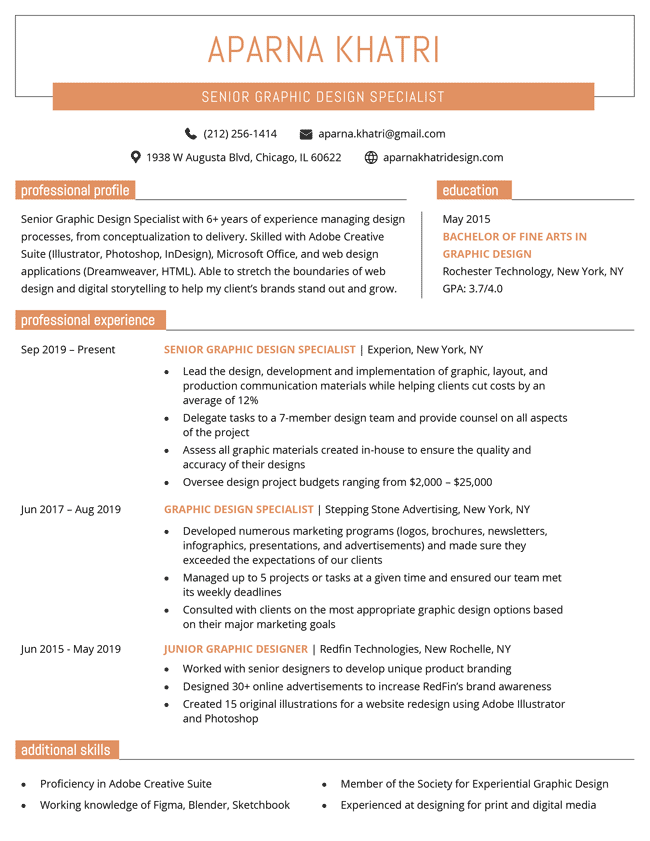
Example of a filled out master resume
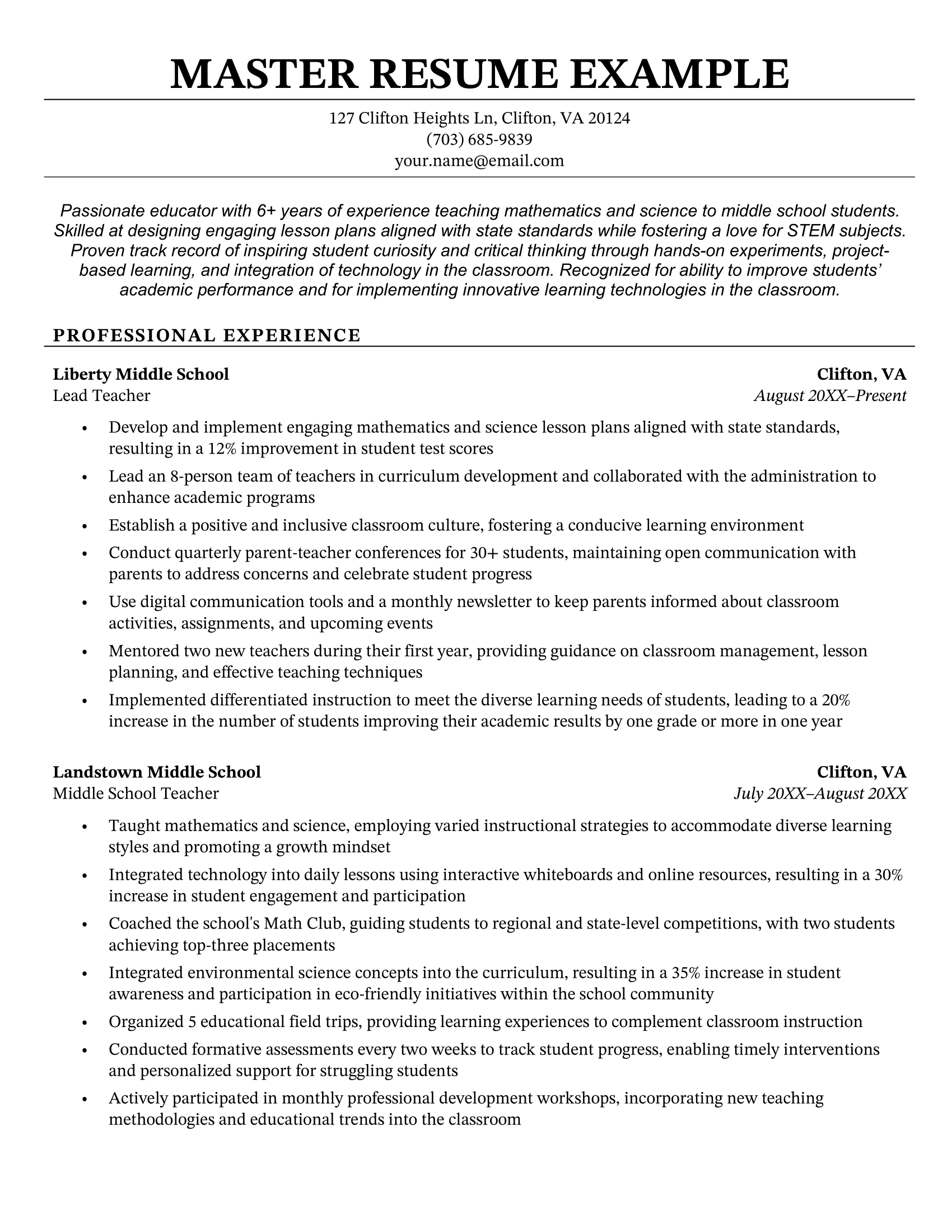
To help you visualize what it should look like, here’s an example of a master resume written by a teacher:
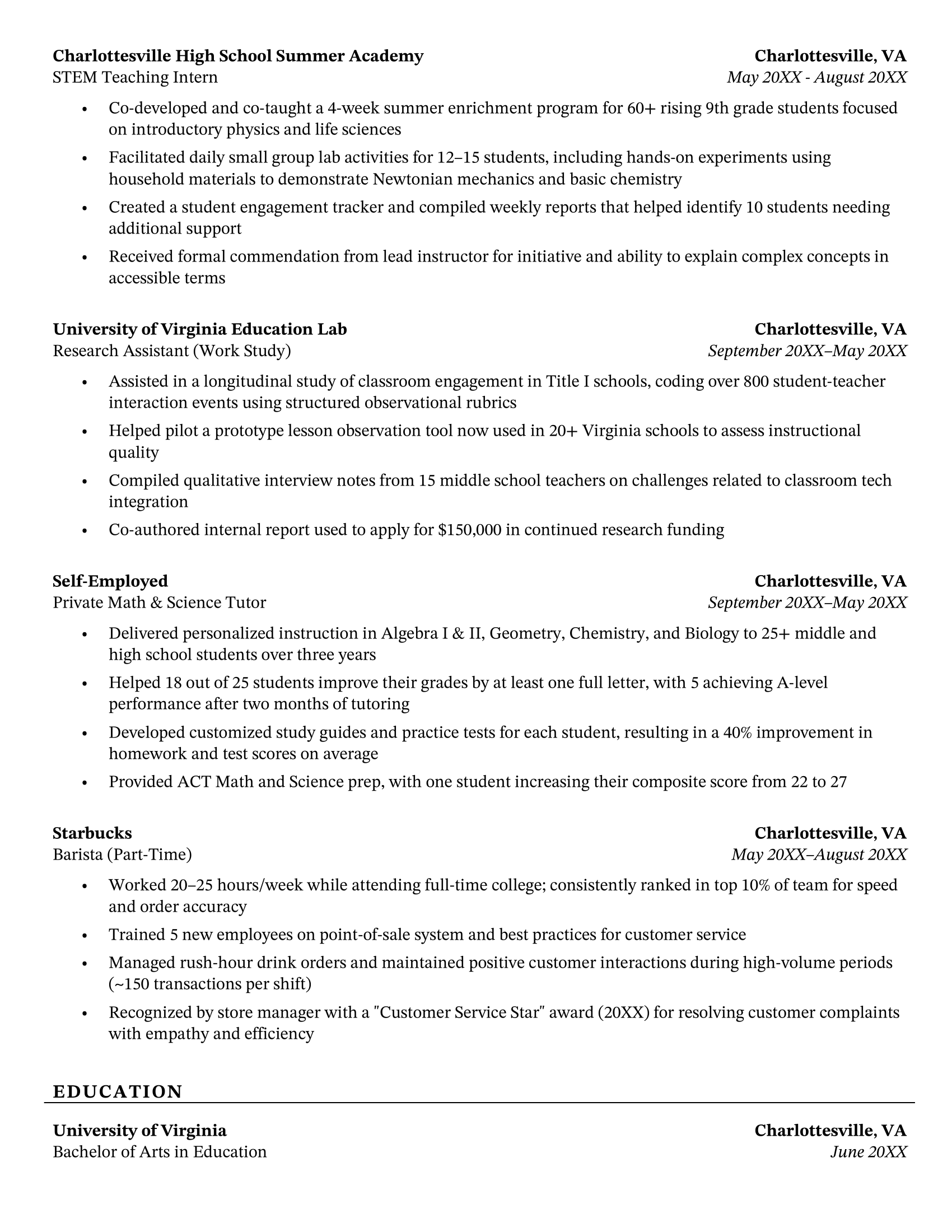
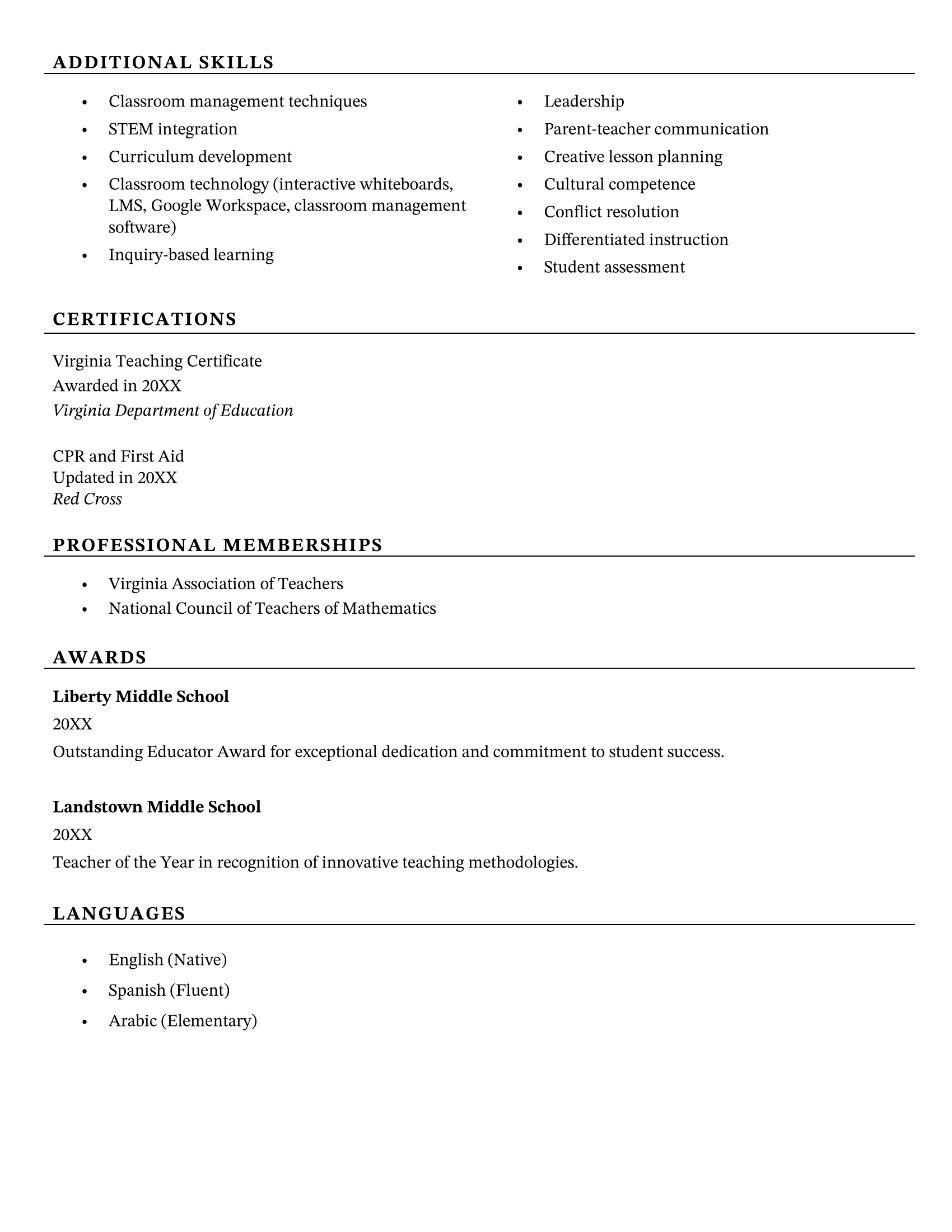
Why use a master resume?
By maintaining one document that includes all of your professional experience, accomplishments, and skills, you never have to rack your brain trying to remember the dates you were employed somewhere, what your accomplishments actually were, or what relevant experience you have.
Plus, you never have to spend time jumping around old versions of your resumes to try to piece it together. It’s all there in one document.
When you want to tailor your resume for a new job application, simply make a copy of your master resume and take out everything that’s not relevant to the job to end up with a targeted resume.
Master resume template
Your Address – optional
City, State, ZIP
Phone Number
Email Address
LinkedIn URL
Portfolio URL – if applicable
RESUME SUMMARY
Results-driven [Job Title] with [#] years of experience in [Industry/Industries]. Proven track record of [key achievements or strengths]. Skilled in [skill 1], [skill 2], and [skill 3]. Seeking opportunities to [goal, e.g., contribute to innovative projects, lead teams, grow in a fast-paced environment].
SKILLS
(Group by category for better organization, and add as many as needed)
Technical Skills:
- e.g., Python, JavaScript, Adobe Creative Suite, SQL
Project Management:
- e.g., Agile, Scrum, Jira, Trello
Communication & Leadership:
- e.g., Public Speaking, Cross-Functional Collaboration, Team Leadership
Languages:
- e.g., English (native), Spanish (conversational)
PROFESSIONAL EXPERIENCE
(List everything here – jobs, internships, part-time and freelance work, as well as all accomplishments.)
Job Title
Company Name – City, State
Month 20XX – Month 20XX
- Responsibility or achievement 1 – start with a strong verb and quantify if possible
- Responsibility or achievement 2
- Responsibility or achievement 3
- Tools, software, or methodologies used
- Awards, promotions, or recognitions received
Job Title
Company Name – City, State
Month 20XX – Month 20XX
- Repeat the same structure for each job
- Add all your past roles
EDUCATION
Degree or Program
School Name – City, State
Month 20XX – Month 20XX
- Relevant coursework or honors
- GPA – optional
CERTIFICATIONS & TRAINING
Certification Name – Issuing Organization, Month 20XX
Online Course or Workshop – Provider, Month 20XX
PROJECTS (optional but useful for creative, tech, or student roles)
Project Title
Month 20XX – Month 20XX
- What you built/did, who it was for, and why it mattered
- Skills or tools used
AWARDS & HONORS
Award Name, Awarding Body, 20XX
Scholarships, academic honors, workplace recognition, etc.
VOLUNTEER EXPERIENCE
Role
Organization – City, State
Month 20XX – Month 20XX
- Contribution, leadership, skills gained
- Professional Affiliations (optional)
- Association Name, Role or Membership Type, Years Active
Tips for using this template effectively:
- Keep everything in this master file. Don’t delete older jobs or minor roles – you might need them later.
- Use consistent formatting (especially with dates and bullet points) and format as you add to the document so that you don’t have to spend a long time reformatting sections later.
- When applying to a job, duplicate this document and cut out irrelevant sections to create your tailored resume.
- Update your master resume with new accomplishments every 3–6 months – even if you’re not job hunting.
How to write a master resume
Here’s how to write a master resume that makes applying for jobs quick and easy:
1. Use your most recent resumes for reference
You don’t need to write your master resume from scratch. Instead, use the information listed on your most recent resume(s) and copy-paste the information you need to your master resume.
Keep in mind that if it’s been years since you last wrote a resume, you’ll probably have a lot of gaps to fill in on your master resume.
If you have a long career behind you and are already established in your field, you don’t need to include unrelated jobs from early in your career.
2. Add more bullet points than you normally would
On a regular resume, the recommended number of resume bullet points is three to five per job listed. This advice doesn’t apply to master resumes, because you don’t need to worry about keeping your document to the recommended resume length of one page.
Instead, add as many bullet points as you need to showcase all your professional achievements in each role.
Once you apply to a job, you can just cut the bullets down to a more appropriate number, keeping the ones that demonstrate how your experience aligns with a prospective role.
Just like you would when making a resume for a job, quantify your master resume by using hard numbers and percentages whenever possible.
3. List all your top skills
Typically, a resume should be tailored to a specific role by emphasizing skills found in the job ad. For your master resume, however, list all the skills you have that could help you land a job in the future.
This means that if you see yourself making a career change in the future or applying for a different job in the same field, you should include skills relevant for those roles too. Having a comprehensive list of your abilities will help make the resume writing process much smoother once you’re ready to start your job hunt.
If you have a long list of skills, consider breaking it up into hard skills and soft skills to enhance readability.
4. Include additional sections
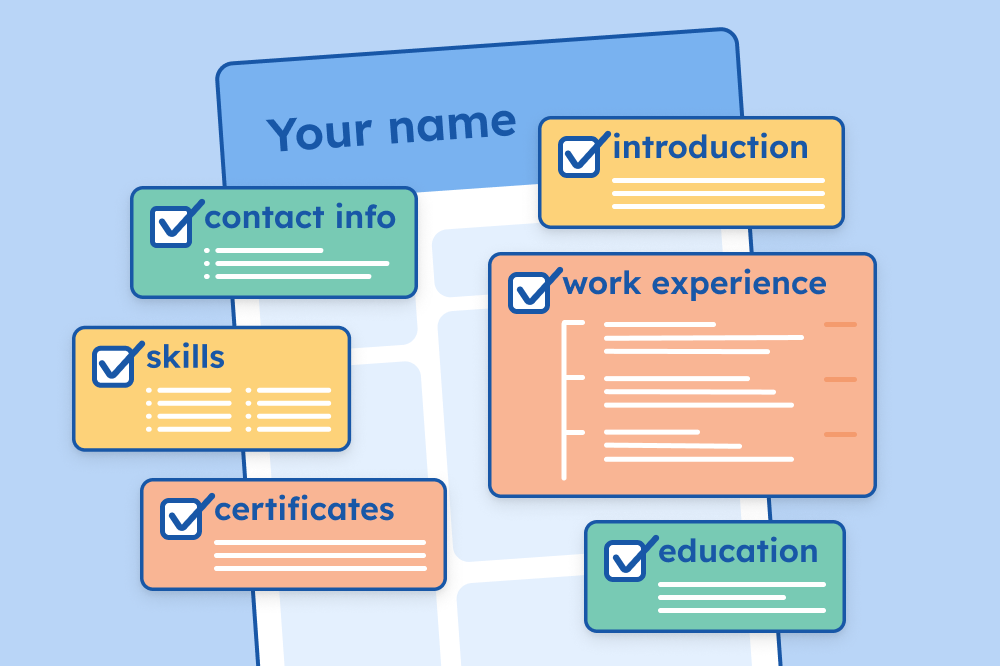
A traditional resume has an introduction, work experience, education, and skills section.
On your master resume, add additional sections so you have an overview of all your qualifications the next time you apply for a job.
Some examples of resume sections to include on your master resume are:
- Certifications
- Publications
- Professional memberships
- Languages
- Projects
- Awards
5. Leave room for tailoring
Create a master resume that’s easy to tailor by considering how you’re going to tweak it for specific jobs and building some easy-to-swap-out content into the resume.
For example, if you’re a teacher like the candidate in the example above, and you’re looking for jobs both in teaching and in the EdTech field, it will be helpful to:
- Write two separate resume summaries for each potential career path that each address the candidate’s relevant experiences, skills, and goals
- Include several bullet points under each role to highlight skills and accomplishments that hiring managers in each field will want to see
- Fill out the skills section with all the skills that are required and desirable for both career paths
Doing this work when you build your master resume makes it much easier to create multiple versions of your resume for different career opportunities. Even just adding one sentence to the end of your resume summary that you update for each role can be an effective way to show employers you’re putting effort into your application.
6. Update your master resume regularly
You never know when a job opportunity might present itself and you’ll need a new resume. Updating your master resume regularly will ensure that you’re prepared for such opportunities, and you won’t have to spend as much time putting your application together.
Go over your master resume a couple of times a year to make sure the numbers in your bullet points are up-to-date and add any new accomplishments you’ve achieved since you last updated your resume.
Additional resume resources
Here are some extra resources to help you create a standout resume:
- Resume Templates for 2026
- Resume Examples for Jobs in 2026
- How to Make a Resume for a Job in 2026
- AI Resume Summary Generator
- 100+ Best Skills for Your Resume (According to Employers)
Master resume FAQs
Still have unanswered questions? Check out our answers to these frequently asked questions about master resumes:
What is the difference between a resume and a master resume?
A standard resume is a one to two page document you use for applying to jobs that includes your professional experience, skills, education and accomplishments.
A master resume is a comprehensive document just for your own reference that includes all of your work experience, education, certifications, accomplishments, and skills. It’s not meant to be submitted with applications, but instead serves as a personal file you can pull from to create targeted resumes quickly and accurately.
What is the difference between a targeted resume and a master resume?
A targeted resume is customized for a specific job posting. It includes only the most relevant details from your career history and is written to match the language and priorities of a specific employer or industry.
A master resume is the foundation for your targeted resumes. As mentioned above, it’s a full record of all your qualifications, regardless of whether they’re relevant to a particular job.
How long should a master resume be?
There’s no limit to how long a master resume should be – it can be as long as needed to include your full professional history. A master resume might be 3-5 pages or more, depending on your level of experience. The goal is completeness, not brevity. Just make sure it’s organized and easy to scan so you can quickly adjust it to suit your needs.
Our resume builder can make you a resume in as little as 5 minutes. Pick the template you want, and our software will format everything for you.
About the Author

A dedicated member of the Resume Genius team with a passion for the career space, Corissa is always looking for ways to create useful resources for job seekers, from writing job-specific resume samples to crafting in-depth articles on how to ace interviews.
Corissa graduated from the University of Colorado at Boulder with a B.A. in Philosophy and a certificate in Peace and Conflict Studies.
Corissa’s articles have been published on Diversity Jobs, Recruiter.com, Teachstone, and Jobillico, among others, and her career advice has been featured in Forbes, Bloomberg Businessweek, GOBankingRates, and UpJourney. You can connect with her on LinkedIn.