
Blog Cover Letter Help Cover Letter Format
Cover Letter Format: Template, Examples, & Guide
 Written By Lauren MastroniCareer Expert & Senior Digital Content Writer
 Reviewed By Geoffrey ScottSenior Hiring Manager & Career Coach
Lauren Mastroni is a Senior Digital Content Writer at Resume Genius, where she creates data-driven career content and actionable job search advice. With a background in academic research, she brings...

Make a strong first impression with a well-formatted cover letter. Learn how to correctly format your cover letter with our template, guide, and checklist.
In this article, we’ll break down a cover letter section by section and provide a checklist for you to follow to make sure your cover letter is ready to submit.

Proper cover letter format (copy & paste template)
Below is a cover letter outline written according to best practices. Just copy it into your favorite cover letter template design and fill in your own information to quickly create a well-structured cover letter:
FIRST NAME LAST NAME
[Today’s Date]
[Hiring Manager’s Name]
123 Company Address
Company’s City, State, Zip Code
(xxx) xxx-xxxx
hiring.manager@gmail.com
Dear [Ms./Mr./Mx.] [Hiring Manager’s Last Name],
Introduction
I’m excited to see the listing for [Position Title] at [Company or Firm] on [Website Name]. As a dedicated [Job Title] professional with [# years] of experience in [job-related tasks and responsibilities], I’m confident that I would be a great addition to your [Company or Firm’s] team.
Body paragraph with background information
I’m currently employed for [Company Name], where I [brief overview of job-relevant duties]. Your job listing mentions a need for a working professional with expertise in [industry-specific experience and skills]. My career has given me extensive knowledge in [industry-specific experience and skills], with the following notable career achievements:
Explanation of achievements
- Here, list three to five of your most notable career achievements that are relevant to the job listing
- Use hard numbers to quantify any accomplishments you include to give the hiring manager a clear idea of what you’re capable of
- This could include monetary values, percentages, or any statistics that clearly show the end result of your work
- List real-life examples that demonstrate you possess the necessary key skills and experience listed in the job description
Closing paragraph
I’m confident my proven track record in [industry-specific skills included in the above-bulleted list] will make me an asset at [Company Name], and allow me to contribute immensely to the [department you’re applying to] team.
I look forward to discussing the [Job Position] and my qualifications in detail with you. I’m available for an interview at your earliest convenience. I’ll be in touch next week to follow up and ensure you’ve received my application.
Sincerely,
[Your Name]
How to format your cover letter
Here’s how to structure each section of your cover letter effectively:
Header: Add your name and contact information
Your cover letter’s header should include the following information:
- Name
- Phone number
- Email address
- City and state (optional)
- LinkedIn profile or portfolio website (optional)
Below that, add today’s date and hit enter twice. Then, add the hiring manager’s name, as well as the company’s name and address.
Sarah Thompson
(512) 555-8901
s.thompson@gmail.com
linkedin.com/sarah.thompson
March 4, 20XX
David Williams
Meridian Solutions
9012 Elm Avenue
Centerville, IL 60612
First paragraph: Introduce yourself and show enthusiasm
Start by addressing your cover letter to the hiring manager. Look for their name in the job description or on the company’s website.
If you can’t find a name, you can always start your cover letter with “Dear Hiring Manager” or “Dear [Company or Department Name] Hiring Team.”
Then, in your opening paragraph, specify the job title you’re interested in and say where you saw the listing. Show that you’ve done your homework by expressing enthusiasm for the role and the company.
Additionally, highlight some general information about what makes you a strong candidate. For example, mention some highly relevant skills or achievements.
I’m writing to apply for the Marketing Coordinator position at GreenTech Innovations, as listed on your website. With a background in content creation and digital strategy, I’m excited to contribute my creativity and communication skills to a company making a real impact in sustainability.
If someone the hiring manager knows referred you for the role, mention this referral in your cover letter.
Don’t indent your cover letter paragraphs
This is a common misconception about cover letter formatting. Do not indent. Simply skip a line when you start a new paragraph.
By not indenting your paragraphs, you have more space to showcase your career-related achievements, relevant qualifications, and skills.
Second paragraph: Explain your current role
The body of your cover letter provides extra context for the information on your resume. It should give employers insight into who you are as a professional and answer any questions they might have about your work history.
In your first body paragraph, provide a general summary of your current job. In particular, highlight your:
- Regular duties
- Accomplishments
- Skills
In my current role as a Customer Experience Specialist at Horizon Tech, I’ve led initiatives to streamline support workflows and improve client satisfaction. My day-to-day involves cross-functional coordination, direct client communication, and process optimization, all of which are skills that align closely with the responsibilities of this role.
Third Paragraph: Explain why you’re qualified for the target role
The third paragraph of your cover letter should take the information you just provided about your current job and connect it to your target role.
For example, follow up by highlighting some specific achievements that demonstrate your impact and how you’re the ideal fit for the role you want. You can either format these achievements as paragraph text or as bullet points.
Some of my recent accomplishments include:
- Reduced response time by 30% by redesigning our ticketing workflow and support scripts.
- Trained and onboarded 15+ new reps, contributing to a 20% increase in overall team productivity.
- Led the rollout of a new live chat system, resulting in a 40% boost in real-time customer resolution.
Final paragraph: Conclude your cover letter and thank the reader
Your last paragraph should reiterate how you’d contribute to the company and thank the hiring manager for their time and consideration.
I’m enthusiastic about the opportunity to bring my experience to GreenTech Innovations and help further your mission. I’ve attached my resume and would welcome the chance to discuss how I can support your team. Thank you for your time and consideration.
Before signing your cover letter, close it with any of the following closing phrases:
- Sincerely,
- Best,
- Thank you,
- Respectfully,
Then, either type your name or add an electronic signature.
For example:
Sincerely,
Michele Jerome
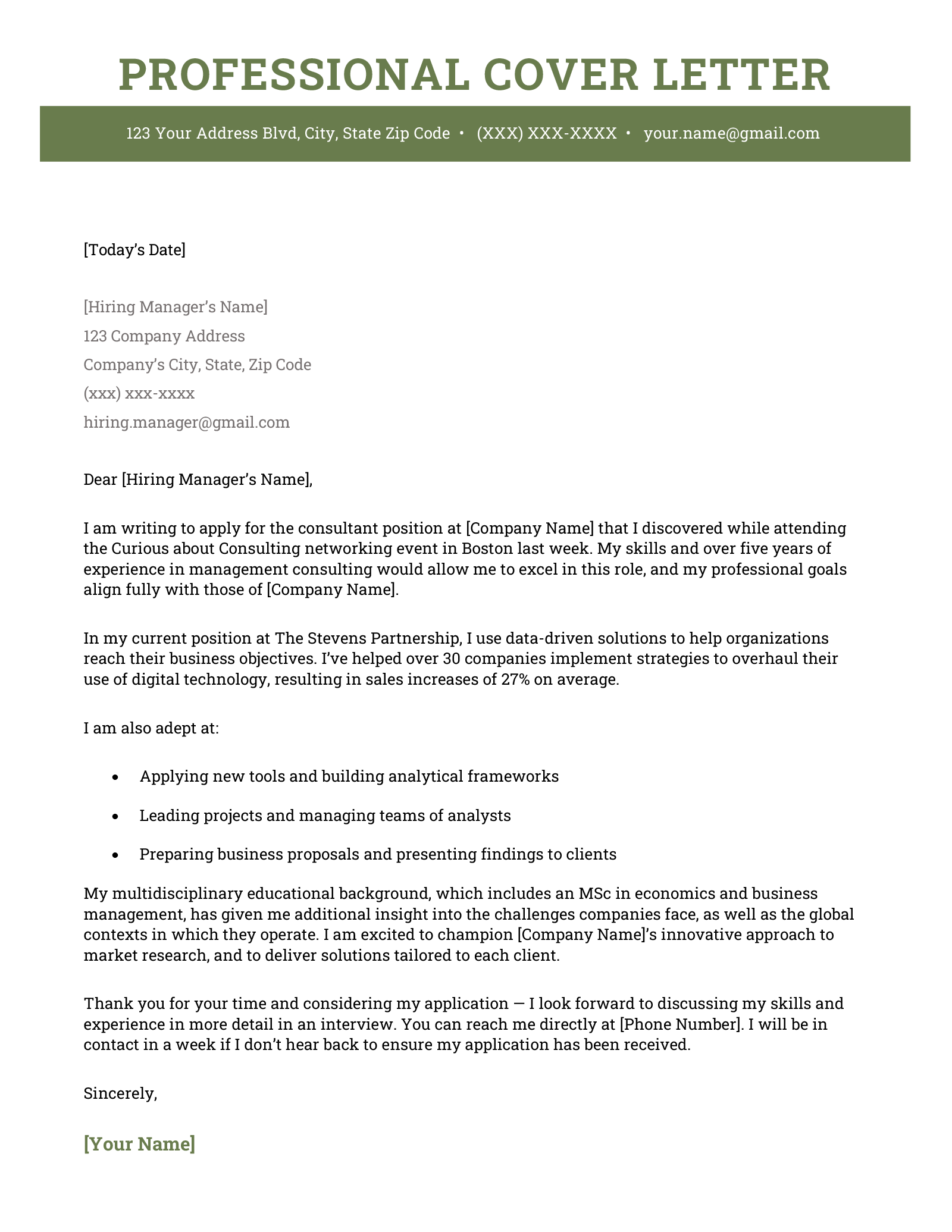
Cover letter format example
Here’s a finished example of a properly-formatted cover letter so you can see what your end result should look like:
Cover letter formatting checklist
Go through this checklist to make sure your cover letter is formatted correctly and ready to send:
Choose a professional font: Select a clean, easy-to-read font like Arial, Calibri, or Times New Roman to keep your letter looking professional
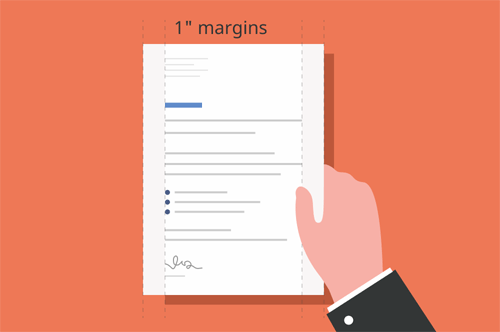
Use proper margins and spacing: Stick to standard 1-inch margins and consistent spacing to ensure your letter is well-balanced and easy to read
Keep it to one page: Limit your cover letter to a single page so employers can quickly review your key qualifications
Proofread: Check for spelling, grammar, and formatting errors to ensure your letter is polished and mistake-free
Save it as a PDF or .docx: Use a standard file format to make sure your cover can be easily opened on any device
Name your file appropriately: Give your file a clear, professional name (e.g., FirstName_LastName_CoverLetter) so it’s easy to identify
About the Author

Lauren Mastroni is a Senior Digital Content Writer at Resume Genius, where she creates data-driven career content and actionable job search advice. With a background in academic research, she brings a research-focused approach to topics like resume writing, interviewing, and career development. Lauren is dedicated to helping job seekers at all stages navigate the hiring process and present themselves more effectively to employers.


Related Articles
Cover Letter Help
Cover Letter Examples for All Job Applications and SituationsLauren Mastroni
Cover Letter Help
How to Write a Cover Letter for a Job in 2026
Conrad Benz
Cover Letter Help
50+ Cover Letter Statistics Hiring Managers Want You to Know
Eva Chan
Cover Letter Help
Cover Letter Templates
Sebastian Morgan
Cover Letter Help
Best Cover Letters of 2026 (10 Good Examples)Sebastian Morgan
Cover Letter Help
5 Short Cover Letter Examples (And How to Write Your Own)Sebastian Morgan
Cover Letter Help
Are Cover Letters Necessary in 2026?Lauren Mastroni
Cover Letter Help
Should a Cover Letter Be Double Spaced? (Spacing Guide & Examples)
Cort Dalton