
• Skip to Content
  • Skip to Sidebar
  • Skip to Footer
Resume Genius home
  • View All Free Resume Templates
    Professional Designs
    • Basic
    • Creative
    • Modern
    • Minimalist
    File Types To Download
    • Word
    • Google Docs
    • PDF
    • Pages
    Formats
    • Chronological
    • Functional
    • Combination
    • Infographic
    Situational Templates
    • ATS
    • Entry Level
    • Picture
    • Blank

    Build your resume with a professional template

    Choose one of our ATS-friendly templates, pick your favorite layout and color, and apply for jobs within the app. Test it out today.

  • View All Resume Examples
    For Students
    • High School
    • Internship
    • College
    • Student CV
    By Experience
    • No Experience
    • Mid-Career
    • Manager
    • Executive
    Top Industries
    • Teaching
    • Nursing
    • Administrative Assistant
    • Customer Service
    • Cashier
    • Engineering
    • Graphic Design
    • Server

    Struggling to fill in your resume?

    Our builder's database of expert-written experience bullets plus AI-powered content suggestions transforms a blank page into a perfectly tailored resume. Try it now.

  • Visit the Genius Blog
    Tools
    • AI Resume Generator
    • ATS Resume Checker
    • Resume Summary Generator
    • Bullet Point Generator
    Resumes
    • How to Make a Resume for Any Job in 2026
    • The Best Resume Format for 2026
    • How to Put Skills on Your Resume
    • 40+ Professional Resume Summary Examples
    Cover Letters
    • Cover Letter Templates to Download
    • Cover Letter Examples for All Job Applications
    • How to Write a Cover Letter for a Job in 2026
    • Cover Letter Format: Template & Examples
    CVs
    • Professional CV Templates
    • 400+ CV Examples for Everyone
    • How to Write an Academic CV
    • CV Examples for Students

    Make a resume that stands out

    Our resume builder is powered by decades of industry expertise and the latest job-search tech. Get started now and give your application an edge.

    • The resume genius builder Make a professional resume in just a few minutes.
    • AI Cover Letter Generator Write custom cover letters for every application.
    • Professional CV Maker Create a detailed academic or professional CV.
    Read what our customers are saying about us 10 Best Resume Builders of 2026
  • Pricing
Login Build My Resume

Blog Resume Help Contact Information on Resume

How to List Contact Information on a Resume

Headshot of Sebastian MorganWritten By Sebastian MorganSenior Content Writer & Certified Professional Resume Writer
Headshot of Geoffrey Scott, Senior Manager and Certified Professional Resume Writer at Resume Genius (the smartest online resume builder)Reviewed By Geoffrey ScottSenior Hiring Manager & Career Coach
Headshot of Sebastian Morgan

Sebastian Morgan

Senior Content Writer & Certified Professional Resume Writer

10 years of experienceCPRW

Seb is a Certified Professional Resume Writer with 10 years of combined experience in career counseling and editorial work. With a MA in International Communications from National Chengchi University (Taiwan),...

View Profile
Updated May 7, 2026
Build My Resume NowUpload Existing Resume
Contact information on listed on a resume header
Table of Contents
  • How to List Contact Information on a Resume
    • Full name
    • Email
    • Phone number
    • Optional contact information
    • Example contact information on a resume
    • Contact information to leave off your resume
      • Your full address
      • Personal social media
      • Your current work email
    • Frequently asked questions
      • How do I format my contact details for an ATS?
      • Should I put my ZIP code on my resume?
3 resume templates available in the Resume Genius builder with a banner explaining how quickly you can make a resume

Struggling to get interviews?

Make a professional resume

Share:

  • Copied

Your resume should let employers know how to contact you if they want to move your application forward.

To make things clear, you should list your contact information in your resume header, right at the top of your resume.

Required contact information:
  • Full name
  • Email address
  • Phone number

Full name

Use your preferred professional name. It should match the name on your other application documents, portfolio, and any professional social media profiles you included.

You don't need to include post-nominal letters (e.g., PhD) after your name. Use your education section to highlight your academic qualifications.

Email

Most employers want to reach out via email. Provide a professional address that you would want the employer to see. Your full name separated by periods or dashes is preferable:

✅ joseph.saddler@email.com

❌ grandmaster.flash58@email.com

Create a new email address for your job applications if your current address isn't employer-appropriate. Some tips:

  • Don’t add random numbers to your email because they make it more difficult for the hiring manager to remember. Instead, try variations on your name (like debbielopez@gmail.com, dl.lopez@gmail.com, deborahlouiselopez@gmail.com)
  • Don’t add your birth date to your email address (sally.bush1978@gmail.com) because it could lead to age discrimination
  • Don’t use your current work email

Phone number

Including your phone number allows the employer to quickly reach you if they need to quickly move your application forward. The following formats are all acceptable:

(123) 456-7890

123-456-7890

123 456 7890

Optional contact information

You can choose to include the following optional details:

  • LinkedIn profile
  • Professional website
  • Portfolio

Employers don't need these details to reach you, but including them can strengthen your application by giving more context to your resume.

Make sure any links are clickable, so the employer can quickly access your profile.

Example contact information on a resume

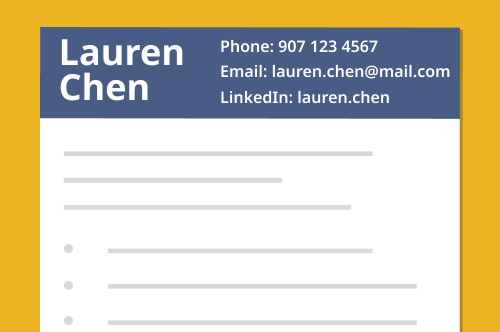
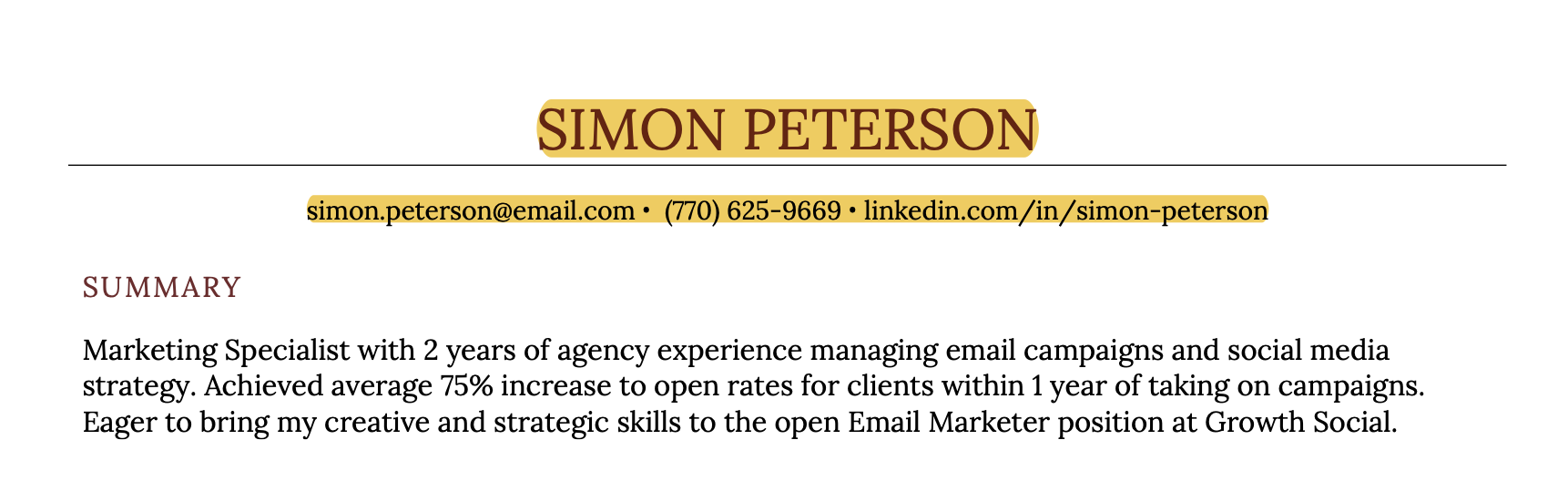
Here's an example resume header with all the necessary information highlighted in yellow.

An applicant's full name and contact information on a resume

Contact information to leave off your resume

Putting certain contact details on your resume will make your application look outdated or careless. Don't share the following information:

Your full address

You don't need to put your address on your resume. Employers never contact applicants by post so they don't need this information.

List your city and state instead. Your rough location is useful for both in-office and remote employers.

Personal social media

Only link to your social media accounts if they're relevant to the job.

Employers rarely need to see your Instagram, TikTok, or Facebook accounts. Linking to a personal profile is unprofessional and increases the risk of employers finding out information about you that you don't want them to know.

Only link to these social media profiles that serve as a portfolio of relevant work (e.g., you share your work as a graphic designer on Instagram).

Your current work email

Avoid using your work email from your current employer, even if it's the main account you use. You don't want your manager to know you're looking for opportunities elsewhere.

Always attach an appropriate personal email address to your resume (e.g., james.surname@email.com).

Frequently asked questions

Here are a few common questions applicants have about listing their contact information.

How do I format my contact details for an ATS?

Clearly separate your contact details so applicant tracking systems can parse the information clearly.

List them vertically (one per line), or keep them on one line separated by clear dividers like "|".

Example (vertical)

Name
Phone Number
Email Address
LinkedIn

Example (horizontal)

Name
Phone Number | Email Address | LinkedIn URL

Should I put my ZIP code on my resume?

No, you do not need to include your ZIP code because employers will not contact you by post.

About the Author

Headshot of Sebastian Morgan
Sebastian Morgan
Senior Content Writer & Certified Professional Resume Writer
10Years of Experience
144Articles Written
8Articles Reviewed

Seb is a Certified Professional Resume Writer with 10 years of combined experience in career counseling and editorial work. With a MA in International Communications from National Chengchi University (Taiwan), he helps job seekers translate their experience into employer-ready applications for global job markets.

Certifications
Certified Professional Resume Writer (CPRW)
Published In
Employee Benefit News 360 Learning The Vector Impact
Expertise
Resume WritingJob Market ResearchFact Checking & Editing Job Application PreparationInterview Coaching
LinkedInLinkedInMuck RackMuck Rack
View Profile
Table of Contents

Related Articles

Resume Help

Resume Examples for Jobs in 2026
Headshot of Geoffrey Scott, Senior Manager and Certified Professional Resume Writer at Resume Genius (the smartest online resume builder)

Geoffrey Scott

March 23, 2026

Resume Help

How to Make or Improve Your Resume Using ChatGPT
Lauren Mastroni, a staff writer at Resume Genius

Lauren Mastroni

April 16, 2026

Resume Help

17 Most Common Resume Mistakes You Need to Avoid
Headshot of Sam Johns, CPRW

Samuel Johns

April 13, 2026

Resume Help

6 Best Resume Paper Types (& How to Choose)
Headshot of Ida Petterson

Ida Pettersson

March 30, 2026

Resume Help

Creative Resume Templates
Headshot of Sebastian Morgan

Sebastian Morgan

September 15, 2026

Resume Help

College Freshman Resume Examples and Writing Tips
Headshot of Corissa Peterson

Corissa Peterson

August 26, 2026

Resume Help

10 Best Resume Builder Websites & Apps in 2026
Headshot of Conrad Benz

Conrad Benz

June 21, 2026

Resume Help

How to Make a Resume for Any Job in 2026
Headshot of Sebastian Morgan

Sebastian Morgan

June 15, 2026
Resume Genius
Linkedin Instagram Youtube Facebook Twitter Tiktok Pinterest Reddit Giphy
RESUMES
  • Resume Builder
  • Resume Templates
  • ATS Resume Checker
  • AI Resume Generator
  • Resume Summary Generator
  • Resume Bullet Point Generator
  • Resume Skills Generator
  • Resume Parser
  • Resume Examples
  • How to Make a Resume
COVER LETTERS
  • Cover Letter Generator
  • Cover Letter Templates
  • Cover Letter Examples
  • How to Write a Cover Letter
  • Cover Letter Format
CVS
  • CV Maker
  • CV Templates
  • How to Write a CV
  • CV Examples
  • CV vs Resume
POLICIES
  • Terms & Conditions
  • Privacy Policy
  • CCPA/GDPR
  • Accessibility
  • Editorial Guidelines
ADDITIONAL RESOURCES
  • About Us
  • Career Experts Program
  • Join Our Team
  • Press & Media Mentions
  • Pricing
  • Product Reviews
  • The Genius Blog
SUPPORT
  • Help & Support
  • Contact Us
  • Forgot Password
  • Frequently Asked Questions
Certified professional resume writer official seal
4.6 / 5 4.5 stars Trustpilot
4.5 / 5 SmartCustomer
Add Resume Genius as a preferred source on Google
support@resumegenius.com (866) 215-9048 [Monday – Friday: 8:00 AM – 7:00 PM (EDT)] [Saturday – Sunday: Closed]

© 2026, Sonaga Tech Limited. All rights reserved

ResumeGenius.com is owned and operated by Sonaga Tech Limited, Hamilton, Zweigniederlassung Luzern with offices in Luzern Switzerland.