IT Support Specialist Resume Examples & Template
 Written By Conrad BenzContent Manager & Hiring Manager
 Reviewed By Geoffrey ScottSenior Hiring Manager & Career Coach
Conrad Benz is a Content Manager and Hiring Manager at Resume Genius. With nearly a decade of experience as a career services professional, Conrad is passionate about helping people navigate...
We also provide five job-specific resume writing tips to show you how to make a resume that earns more interviews.

IT support specialist resumes by experience level
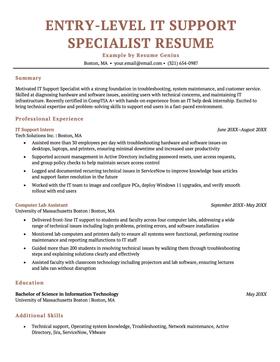
A good resume template is professional and formatted to highlight your greatest professional strengths.
IT support specialist resume template
- Proficient in Java, CS++, HTML 5, Zendesk, ServiceNow, MECM, Windows 10, Mac OS
- Investigate and respond to support requests via email, phone and remote control software
- Enhance support processes and procedures, resulting in a 94% end-user satisfaction rate
- Research new technologies and provide training to staff across all departments to optimize productivity
- Install, configure and manage laptops, phones, printers and other devices for 80+ employees
- Performed network, software and hardware troubleshooting to ensure all systems and 40+ workstations were operating optimally
- Created and updated IT support documentation and user guides, leading to a 15 % decrease in tickets
- Configured and managed Windows 10 builds using Microsoft MECM
- Conducted onboarding and offboarding, including administering email and user accounts
- CompTIA A+ (20XX)
- Information Technology Infrastructure Library v3 Practitioner (20XX)
- Microsoft Certified Solutions Expert (20XX)
Tips for writing a great IT support specialist resume
An IT support specialist resume needs to convince prospective employers that not only are you able to swiftly identify and solve technical problems, but you also have a customer service mindset. Therefore, it’s important to showcase a mix of different types of IT specialist skills.
If you’re interested in pursuing a career in IT support, keep reading to find out how to impress hiring managers and maximize your chances of landing that dream job.
Highlight your relevant skills (including soft skills)
From troubleshooting hardware issues to dealing with confused employees, IT support specialists require a wide set of hard and soft skills to do their jobs well.
Oftentimes, hard skills will be listed as required or highly preferred in the job advertisement. For an IT support specialist, some common hard skills may include:
- Familiarity troubleshooting end-user hardware & software
- Previous experience working with Helpdesk ticketing systems
- Knowledge of various operating systems (ChromeOS, Windows, MacOS, and Linux)
- Experience in workstation installation (i.e. proper cable management)
- Experience deploying new desktop and mobile devices
However, a large part of being a great IT support specialist is working with clients or employees. As such, your resume should also reflect your mastery of relevant soft skills such as:
- Verbal and written communication skills
- People skills
- Patience
- Organizational skills
- Problem solving
- Time management skills
Include relevant certifications
Listing certifications on your resume is normally considered optional, but as an IT professional you should add a certifications section at the top of your resume to show off your most relevant credentials.
You can skip that CPR certification you earned two years ago, but mention if you’re an Apple Certified Support Professional, or a Cisco Certified Network Associate.
Including your certifications will help lend extra credibility to your resume and show that you take your career seriously, and certifications like ACSP and CCNA are often required or preferred for most IT support specialist roles.
Tailor your resume to each job application
Even within the same industry, hiring managers are always looking for candidates who fit a unique company culture or who can solve unique problems.
You’re far more likely to succeed at grabbing their attention if you use your resume to target each job instead of sending out the same generic copy to every job advertisement.
The job listing will tell you all you need to know about what skills and accomplishments to include on your resume to meet the employer’s criteria.
To identify what a potential employer is looking for in a candidate, take a closer look at the job description. Ask yourself the following questions:
- What will your daily duties be?
- What kinds of people will you be working with, and in what capacity?
- What skills does the listing mention?
- What action verbs does the listing use to describe work performance?
- What are the keywords in this job listing?
Use the answers to these questions as a guide for what to include in your resume. For example,
If you will be writing a lot of reports and user guides, highlight your writing skills. If you will be working with other employees as well as customers, show that you are adaptable and have strong interpersonal skills.
Keep your resume focused on the job you want
It can be tempting to list every single piece of software you have knowledge of on your resume. However, when it comes to resume length, bigger isn’t always better. Hiring managers have limited time and attention, so they want to see your more relevant skills and achievements as quickly as possible.
Instead of writing down every one of your achievements since high school, focus on ones that are relevant to the specific job you are applying for.
Measure your success with numbers
Whether it’s the number of desktops deployed or improvements in network speeds, as an IT support specialist most of your job-related successes boil down to hard numbers. The best way to communicate your expertise to employers is by including examples of those numbers on your resume.
However, it can be difficult to know how to add hard numbers to accomplishments on your resume, but even soft skills can be quantified.
Adding data like this to your resume helps show employers how capable you are, and makes them more likely to invite you in for an interview.
Optional: Add a resume summary
Think of a resume summary as an opportunity to show off your most impressive attributes as an employee right from the start. It will complement your cover letter and give the hiring manager a glimpse of what you will bring to the table.
Use your resume summary to highlight your biggest IT-related accomplishment, your work experience, and the personal qualities that make you the perfect fit for the job.
Here’s an example of a strong resume summary for an IT support specialist:
“Dedicated IT professional with 5+ years of experience providing IT support and maintenance. Managed 20+ cases daily for on-site and remote users. Familiar with ITSM and ITIL.”
Now all you have to do is choose a professional resume template.
Build your resume in minutes

Average IT support specialist salaries in the US
After you’ve written your resume, make sure you use it to apply for jobs within a fair salary range.
The following table includes information from the US Bureau of Labor Statistics’ latest Occupational Employment and Wage Statistics report for 2026. Here are the ten states with the highest salaries for IT support specialists, as well as the national average for your reference when applying for work.
Top 10 states by average computer support specialist salary
| State | Salary / Year |
|---|---|
| District of Columbia | $85,690 |
| California | $85,030 |
| Washington | $80,340 |
| Colorado | $77,230 |
| Massachusetts | $76,460 |
| New York | $75,290 |
| Connecticut | $72,960 |
| Maryland | $71,450 |
| New Jersey | $70,970 |
| Virginia | $70,650 |
| National Average | $67,330 |
About the Author

Conrad Benz is a Content Manager and Hiring Manager at Resume Genius. With nearly a decade of experience as a career services professional, Conrad is passionate about helping people navigate the job search process and find fulfilling work.
You can find Conrad’s career insights in publications like Typsy, Resume Library, and more.
Conrad graduated with a B.A. in International Relations from Goucher College in Maryland and currently lives in Taipei, Taiwan, where he helps ensure every article on Resume Genius provides job seekers with the information they need to succeed.
If you want to reach Conrad for a quote or media-related inquiry, you can contact him at [conrad] @ [resumegenius.com].