
• Skip to Content
  • Skip to Sidebar
  • Skip to Footer
Resume Genius home
  • View All Free Resume Templates
    Professional Designs
    • Basic
    • Creative
    • Modern
    • Minimalist
    File Types To Download
    • Word
    • Google Docs
    • PDF
    • Pages
    Formats
    • Chronological
    • Functional
    • Combination
    • Infographic
    Situational Templates
    • ATS
    • Entry Level
    • Picture
    • Blank

    Build your resume with a professional template

    Choose one of our ATS-friendly templates, pick your favorite layout and color, and apply for jobs within the app. Test it out today.

  • View All Resume Examples
    For Students
    • High School
    • Internship
    • College
    • Student CV
    By Experience
    • No Experience
    • Mid-Career
    • Manager
    • Executive
    Top Industries
    • Teaching
    • Nursing
    • Administrative Assistant
    • Customer Service
    • Cashier
    • Engineering
    • Graphic Design
    • Server

    Struggling to fill in your resume?

    Our builder's database of expert-written experience bullets plus AI-powered content suggestions transforms a blank page into a perfectly tailored resume. Try it now.

  • Visit the Genius Blog
    Tools
    • AI Resume Generator
    • ATS Resume Checker
    • Resume Summary Generator
    • Bullet Point Generator
    Resumes
    • How to Make a Resume for Any Job in 2026
    • The Best Resume Format for 2026
    • How to Put Skills on Your Resume
    • 40+ Professional Resume Summary Examples
    Cover Letters
    • Cover Letter Templates to Download
    • Cover Letter Examples for All Job Applications
    • How to Write a Cover Letter for a Job in 2026
    • Cover Letter Format: Template & Examples
    CVs
    • Professional CV Templates
    • 400+ CV Examples for Everyone
    • How to Write an Academic CV
    • CV Examples for Students

    Make a resume that stands out

    Our resume builder is powered by decades of industry expertise and the latest job-search tech. Get started now and give your application an edge.

    • The resume genius builder Make a professional resume in just a few minutes.
    • AI Cover Letter Generator Write custom cover letters for every application.
    • Professional CV Maker Create a detailed academic or professional CV.
    Read what our customers are saying about us 10 Best Resume Builders of 2026
  • Pricing
Login Build My Resume

Blog Resume Help Two-Page Resume

When to Use a Two-Page Resume in 2026 (With Free Resume Templates)

Headshot of Conrad BenzWritten By Conrad BenzContent Manager & Hiring Manager
Headshot of Geoffrey Scott, Senior Manager and Certified Professional Resume Writer at Resume Genius (the smartest online resume builder)Reviewed By Geoffrey ScottSenior Hiring Manager & Career Coach
Headshot of Conrad Benz

Conrad Benz

Content Manager & Hiring Manager

8 years of experience

Conrad Benz is a Content Manager and Hiring Manager at Resume Genius. With nearly a decade of experience as a career services professional, Conrad is passionate about helping people navigate...

View Profile
Updated February 23, 2026
Build My Resume NowUpload Existing Resume
Image illustrating the question can a resume be 2 pages?
Table of Contents
  • When to Use a Two-Page Resume in 2026 (With Free Resume Templates)
    • Can a resume be two pages?
    • When is it okay to have a two-page resume?
    • Two-page resume format
      • 1. Provide key information on page one
      • 2. List additional information on the second page of your resume
      • 3. Fill both resume pages
      • 4. Present your two-page resume properly
    • 2-page resume examples
      • Our Pro 2-page resume template
      • Our Business 2-page resume template
    • Frequently asked questions about two-page resumes
      • How do you make a two-page resume?
      • Do employers prefer one or two-page resumes?
      • Is it okay to have a 1.5-page resume?
      • Do you print a resume double sided?
3 resume templates available in the Resume Genius builder with a banner explaining how quickly you can make a resume

Struggling to get interviews?

Make a professional resume

Share:

  • Copied

Wondering if your resume should be one page or two? Learn when a two-page resume makes sense, how to format it correctly, and see real examples that help you stand out.

“Should a resume be one page?” is a question many job seekers have mulled over. While most people should use a one-page resume, there are cases when using a two-page resume can improve your chances of landing that job.

Can a resume be two pages?

Absolutely! You can use a two-page resume if you've got enough relevant information to include and it shows how you're qualified for a specific position.

The recommended resume length is one page, but it's okay to use a two-page resume if making it one page means omitting relevant qualifications and experience. In that case, instead of struggling to fit everything onto one page, go ahead and add a second page to your resume.

Build My Resume
Our resume builder can make you a resume in as little as 5 minutes. Pick the template you want, and our software will format everything for you.

When is it okay to have a two-page resume?

Here are some general guidelines for when you should use a two-page resume:

  • You have substantial (10+ years) relevant work experience
  • You’re applying for a leadership or management role
  • You have numerous relevant technical skills or certifications

If you're in one of these groups, you probably need the extra page to adequately outline your qualifications and shouldn't feel pressured to squeeze everything onto the first page. Hiring managers don't like reading walls of text.

However, if you're an entry-level or early-career candidate, you should stick to one page because you don't have much experience yet and should be able to comfortably fit everything onto one page. If your resume is going over one page just slightly, try cutting information that's not strictly relevant to the position, or adjusting your resume formatting.

In specific professions, longer resumes are expected. For example, if you work in academia, you’ll need to write a longer-form academic CV, which can sometimes be more than 10 pages long.

Build your resume in minutes

Use an AI-powered resume builder and have your resume done in 10 minutes. Simply select your template, and our software will walk you through each step.
Build My Resume

Two-page resume format

Writing a two-page resume is easy if you already know how to write a resume. But, there are a few things you should keep in mind to convince hiring managers that your resume is worth the extra time.

1. Provide key information on page one

Start your first page with a resume introduction. For experienced job seekers, a resume summary is the best option because you can highlight four or five of your biggest career-related achievements.

Below is an example of what a resume summary looks like:

General Manager with 10+ years of experience driving revenue performance, growth, and service excellence for well-established hospitality organizations. Proven expertise in executing robust strategies, managing large budgets, and improving processes that result in reduced costs and higher quality. Instrumental in overseeing multi-venues, controlling costs, and keeping employee turnover rates below industry standards.

This resume summary gives a concise overview of the candidate's work history while spotlighting their skills and accomplishments.

After your introduction, list your work experience. On a chronological resume, list your most recent job first, and then work backward. You can use your second page to continue your work experience section if necessary, but make sure the listed experience is still relevant to the role you're applying for.

The best resume templates for 2026

One of the best ways to make your resume is by filling out one of our free resume templates. All our templates are designed by experts and free to download for Microsoft Word or Google Docs.
View Resume Templates

2. List additional information on the second page of your resume

Since you're using a two-page resume, it's likely you have a lot of relevant work experience, which means that other sections of your resume, like your education section, are less important. You can put your education section on the second page along with other secondary qualifications.

If you have a relevant degree or qualification you want to highlight on your first page (for example a degree that's specifically listed as a requirement), include it in your resume introduction to make sure the hiring manager sees it.

3. Fill both resume pages

If you opt for a two-page resume, try your best to fill both pages. While hiring managers aren't likely to be upset about a 1.5-page resume (where the second page is only half-filled), they don't make as good an impression and should be avoided if possible.

If you truly can't fill that second page, try cutting your resume down to one page instead. As long as you focus on your most relevant achievements and show that your experience aligns you with the role, this shouldn't be a problem.

Add volunteer work and extracurricular activities to fill the second page

If you're not able to condense your resume further without losing important information, round out your second page by adding volunteer work to your resume.

Volunteer experience shows the hiring manager a personal side to your resume that your work experience doesn't touch on.

Also consider adding extracurricular activities and relevant coursework to your resume if they tie into the job you want. Do some research on the company to find out if they promote individuality and diversity in the workplace. If so, including details that illuminate your unique perspective could give you an edge over someone who only lists work-related information.

Other additions, such as professional associations, projects, and awards can also help highlight what makes you the perfect candidate.

4. Present your two-page resume properly

If you need to print out a physical copy of your two-page resume, follow these tips to make it look professional:

Use two pieces of paper: Instead of printing your resume out double sided on a single piece of paper, print it onto two separate pages. If you give a hiring manager a double-sided resume, they might not realize there's a second page.

Use a paperclip instead of stapling: It's likely the hiring manager will scan your resume, and using a paperclip makes it easier for them to place it in the scanner. They can also remove the paperclip if they want to lay both pages down and see them at the same time.

Pick suitable resume paper: Your resume paper should stand out in a pile of resumes. We recommend linen 100% cotton 32 lb, but there are other great options as well.

2-page resume examples

Here are a couple two-page resume examples you can use as inspiration when you write your own:

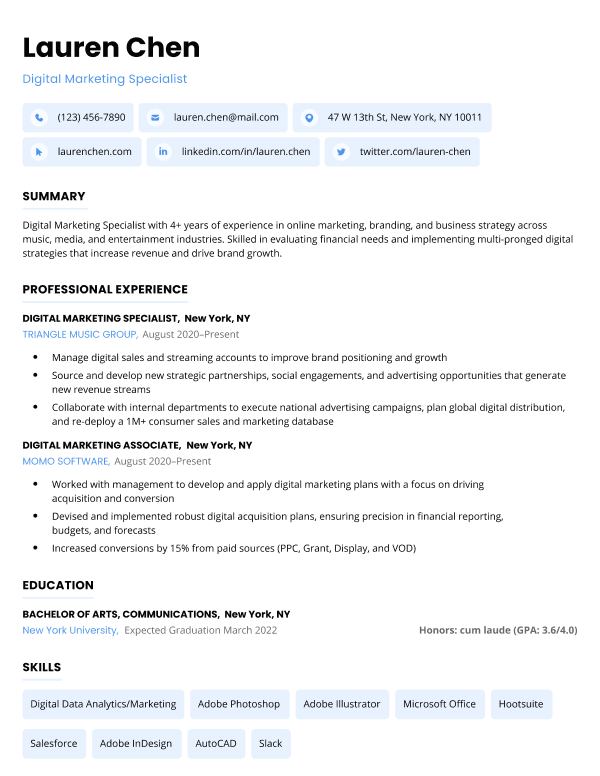
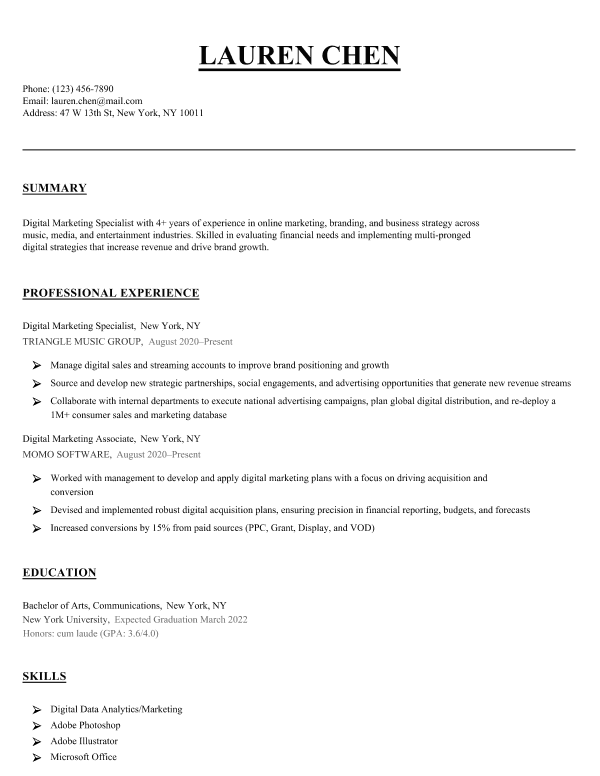
Our Pro 2-page resume template

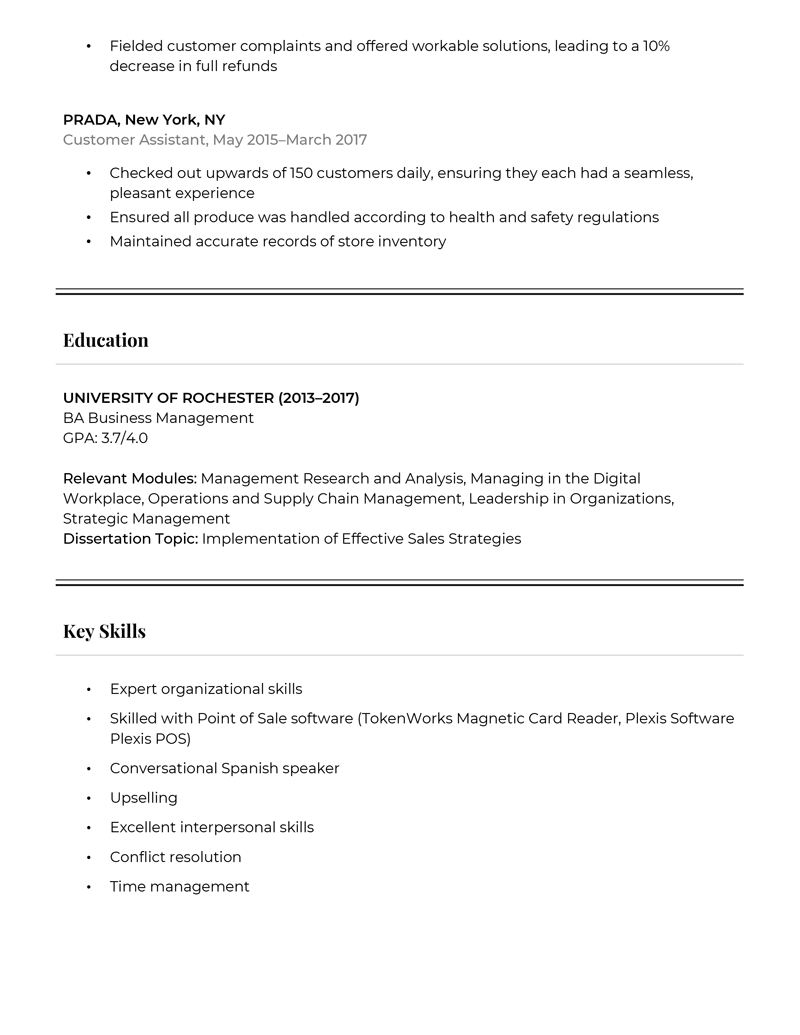
Our sophisticated Pro template makes your resume easy to scan and parse, and offers visual appeal with bold dividing lines.

First page of the pro two-page resume template, containing the candidate
Page 1
The second page of the pro two-page resume example template, containing some additional work experience, education, and skills.
Page 2
Download This Free Template

Our Business 2-page resume template

This Business resume template offers you the perfect space to let your experience shine while offering a sleek aesthetic. It even includes space for you to add another section or expand on your extensive work experience.

First page of the business two-page resume example template, containing the candidate
Page 1
Second page of the business two-page resume example template, containing some additional work experience and a skills section.
Page 2
Download This Free Template

Frequently asked questions about two-page resumes

Here are some commonly asked questions related to two-page resumes:

How do you make a two-page resume?

Here's how you make a two-page resume:

  • On the first page, write your contact details, resume introduction, and begin your work experience section.
  • On the second page, continue your work experience section, then write your education section and skills section.
  • Make sure you add page numbers so that the reader knows your resume is two pages.

Making a two-page resume is just like making a one-page resume. A two-page resume simply has a longer experience section. If you don't have enough experience related to the job you want, consider writing a one-page resume instead.

Do employers prefer one or two-page resumes?

Most employers don't have a preference between one or two-page resumes, as long as the resume length you choose is appropriate for your level of experience.

Remember to use a one-page resume when you have less than 10 years of relevant experience or when applying for entry-level and mid-career positions.

Is it okay to have a 1.5-page resume?

While hiring managers won't think less of you for having a 1.5-page resume, try to avoid it if possible. It looks neater and more professional to format your resume on one or two full pages.

The most important thing is to make sure you succinctly include all of your relevant experience and qualifications to show hiring managers why you're the best fit for the role.

If your resume continues onto the second page, try trimming your information down to one page by cutting things like old experience, irrelevant skills, or unnecessary information about your education.

Do you print a resume double sided?

No, you do not print a resume double sided. A double-sided resume looks unprofessional and makes it difficult for hiring managers to look at all of your qualifications at once.

Print out both pages and paperclip them together instead.

Build your resume in minutes

Use an AI-powered resume builder and have your resume done in 10 minutes. Simply select your template, and our software will walk you through each step.
Build My Resume

About the Author

Headshot of Conrad Benz
Conrad Benz
Content Manager & Hiring Manager
8Years of Experience
77Articles Written
508Articles Reviewed

Conrad Benz is a Content Manager and Hiring Manager at Resume Genius. With nearly a decade of experience as a career services professional, Conrad is passionate about helping people navigate the job search process and find fulfilling work.

You can find Conrad’s career insights in publications like Typsy, Resume Library, and more.

Conrad graduated with a B.A. in International Relations from Goucher College in Maryland and currently lives in Taipei, Taiwan, where he helps ensure every article on Resume Genius provides job seekers with the information they need to succeed.

If you want to reach Conrad for a quote or media-related inquiry, you can contact him at [conrad] @ [resumegenius.com].

Expertise
Resume Writing Team Management Career Coaching Copywriting Interview Preparation Content Strategy Hiking
Twitter/XTwitter/XLinkedInLinkedInMuck RackMuck Rack
View Profile
Table of Contents
Rate our article

Click to rate this article

4.7 Average rating

46 people rated this article

Related Articles

Resume Help

Resume Examples for Jobs in 2026
Headshot of Geoffrey Scott, Senior Manager and Certified Professional Resume Writer at Resume Genius (the smartest online resume builder)

Geoffrey Scott

March 23, 2026

Resume Help

How to Make or Improve Your Resume Using ChatGPT
Lauren Mastroni, a staff writer at Resume Genius

Lauren Mastroni

April 16, 2026

Resume Help

6 Best Resume Paper Types (& How to Choose)
Headshot of Ida Petterson

Ida Pettersson

March 30, 2026

Resume Help

17 Most Common Resume Mistakes You Need to Avoid
Headshot of Sam Johns, CPRW

Samuel Johns

April 13, 2026

Resume Help

Creative Resume Templates
Headshot of Sebastian Morgan

Sebastian Morgan

September 15, 2026

Resume Help

10 Best Resume Builder Websites & Apps in 2026
Headshot of Conrad Benz

Conrad Benz

June 21, 2026

Resume Help

How to Make a Resume for Any Job in 2026
Headshot of Sebastian Morgan

Sebastian Morgan

June 15, 2026

Resume Help

College Freshman Resume Examples and Writing Tips
Headshot of Corissa Peterson

Corissa Peterson

August 26, 2026
Resume Genius
Linkedin Instagram Youtube Facebook Twitter Tiktok Pinterest Reddit Giphy
RESUMES
  • Resume Builder
  • Resume Templates
  • ATS Resume Checker
  • AI Resume Generator
  • Resume Summary Generator
  • Resume Bullet Point Generator
  • Resume Skills Generator
  • Resume Parser
  • Resume Examples
  • How to Make a Resume
COVER LETTERS
  • Cover Letter Generator
  • Cover Letter Templates
  • Cover Letter Examples
  • How to Write a Cover Letter
  • Cover Letter Format
CVS
  • CV Maker
  • CV Templates
  • How to Write a CV
  • CV Examples
  • CV vs Resume
POLICIES
  • Terms & Conditions
  • Privacy Policy
  • CCPA/GDPR
  • Accessibility
  • Editorial Guidelines
ADDITIONAL RESOURCES
  • About Us
  • Career Experts Program
  • Join Our Team
  • Press & Media Mentions
  • Pricing
  • Product Reviews
  • The Genius Blog
SUPPORT
  • Help & Support
  • Contact Us
  • Forgot Password
  • Frequently Asked Questions
Certified professional resume writer official seal
4.6 / 5 4.5 stars Trustpilot
4.5 / 5 SmartCustomer
Add Resume Genius as a preferred source on Google
support@resumegenius.com (866) 215-9048 [Monday – Friday: 8:00 AM – 7:00 PM (EDT)] [Saturday – Sunday: Closed]

© 2026, Sonaga Tech Limited. All rights reserved

ResumeGenius.com is owned and operated by Sonaga Tech Limited, Hamilton, Zweigniederlassung Luzern with offices in Luzern Switzerland.

Your review would mean a lot to us.

We hope our free downloadable resources will help you on your path to career success. If you have time, a quick review would really make our day (it'll only take 15 seconds). Best of luck on the job hunt!

Leave A Review