
Blog Resume Help Resume Guidelines
Resume Guidelines: 18 Formatting & Writing Rules for 2026
 Written By Nathan SotoPR Specialist & Certified Professional Resume Writer
 Reviewed By Conrad BenzContent Manager & Hiring Manager
Nathan Soto
PR Specialist & Certified Professional Resume Writer
Nathan Soto is dedicated to providing practical guidance to job seekers, especially people with nonlinear career paths. Nathan graduated from the University of Nevada with a double B.A. in French...

- 1. Use the right resume format
- 2. Keep it short and clear
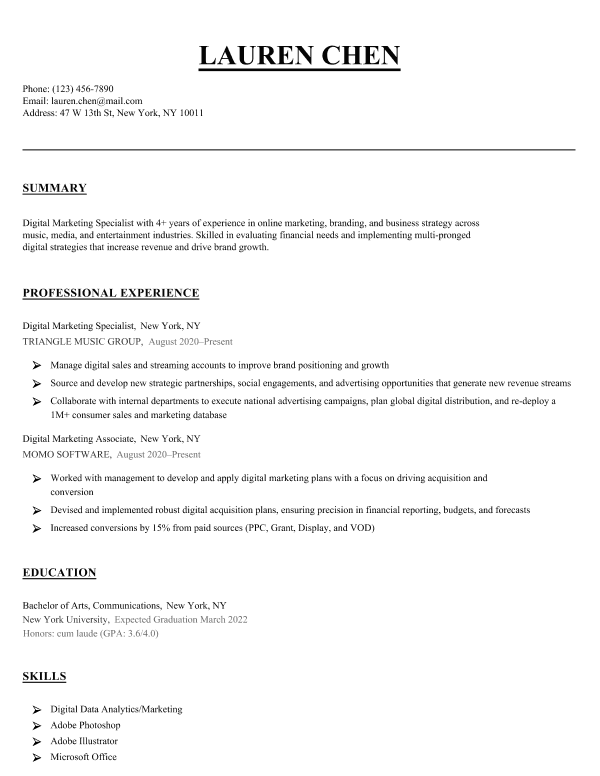
- 3. Use a plain, legible font
- 4. Use a header with your name and desired job title
- 5. Don't use images or icons
- 6. Write an eye-catching resume summary
- 7. List your professional accomplishments
- 8. Use numbers
- 9. Add your most recent degree
- 10. Emphasize your skills in a dedicated section
- 11. Include other relevant information to stand out
- 12. Don't use "I" or "me"
- 13. Use action words
- 14. Use keywords from the job description
- 15. Tailor your resume
- 16. Proofread thoroughly
- 17. Save your resume as a PDF file
- 18. Use a professional file name
- More writing guidelines

Struggling to get interviews?
We’ll show you how to distinguish your resume in the crowded job market and follow current resume trends with these 18 formatting and writing rules.

1. Use the right resume format
There are three main resume formats to choose from:
- Chronological resume: Focuses on professional experience, listed in reverse chronological order. Most resumes use this format.
- Functional resume: Emphasizes a large skills section over work history.
- Combination resume: Gives equal space to your skills and work experience sections.
Pick a format that lets you place your most relevant skills and accomplishments near the top of your resume where employers will quickly notice them.
2. Keep it short and clear
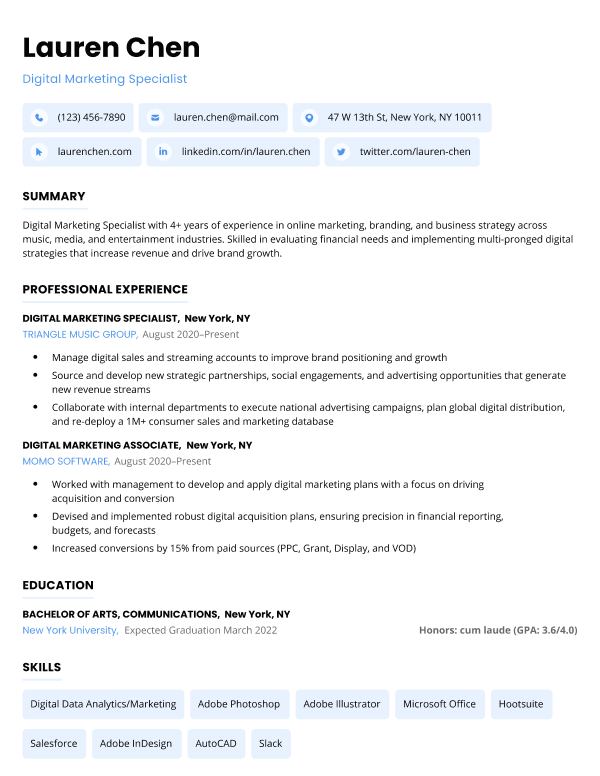
Stick with a one-page resume whenever possible so employers can quickly skim your qualifications and determine your fit for the role. Keeping your resume concise ensures employers don't miss any of your key accomplishments.
Your resume should only reach 2–3 pages when you have 10+ years of experience or if you're submitting a federal resume or a CV.
3. Use a plain, legible font
The best fonts for a resume are easy to read. These fonts follow resume formatting guidelines and clearly present your qualifications to employers:
- Cambria
- Calibri
- Times New Roman
Font size matters, too. Keep your font size between 10.5 pt and 12 pt.
4. Use a header with your name and desired job title
In your resume’s header, write your name in extra-large, bold text. Beneath that, in large text, write your desired job title.
Then, list your contact information in the same 10.5 pt to 12 pt font size you use for the rest of your resume.
Search our entire library of professionally-written resume examples for every job title.
5. Don’t use images or icons
Keep your resume ATS-friendly by avoiding images and icons, including background images in the design of your resume. ATS software might misread these which may cause issues when entering your information into an employment portal, or cause your resume to get rejected.
Use a resume parser to make sure your resume doesn’t have any formatting issues that make ATS software unable to correctly read your resume.
6. Write an eye-catching resume summary
Write a 3-sentence resume summary that says who you are, what you've accomplished, and lists a couple of skills that make you a good fit for your target job. Follow this format:
- Sentence 1: Your professional identity (e.g., “Digital Marketing Specialist” or “Psychology Major”) and your main selling point as a candidate
- Sentence 2: A specific accomplishment or skill that shows your expertise and fit for the job
- Sentence 3: Additional skills or certifications that put you ahead of similarly qualified candidates, such as a license or relevant certificate
7. List your professional accomplishments
Present your accomplishments in your work experience section. List your achievements in 2–4 bullet points under each job title to show employers what you're capable of.
8. Use numbers
List percentages, dollar amounts, and other metrics in your work experience bullet points. This helps present your achievements clearly to employers, and is much more impactful than listing your job responsibilities.
9. Add your most recent degree
Put your highest academic degree and school name in your resume’s education section. If you don't have much work experience, you can also list relevant coursework on your resume.
10. Emphasize your skills in a dedicated section
In the skills section of your resume, list your hard skills, including any foreign language skills, computer skills, and certifications that are relevant to your target job.
11. Include other relevant information to stand out
If you have volunteer experience or extracurricular activities that are related to the job you want, add them to your resume. And, quantify the experience if possible.
12. Don’t use “I” or “me”
You shouldn't say “I” in a resume for two reasons:
- Starting your bullet points with the verb is more concise and helps employers skim your qualifications. So instead of saying “I optimized our file organization,” say “Optimized file organization”
- Repeating “I” and “me” throughout your resume could read as bragging
13. Use action words
Use action verbs to describe your achievements. For example, replace terms like "tasked with" or "responsible for" with words like "oversaw" and "coordinated."
14. Use keywords from the job description
Include skills and other key terms from the job ad on your resume. This helps make your resume ATS-friendly, and it makes sure your resume shows employers what they're looking for.
15. Tailor your resume
Fine-tune your resume for every new job application you submit. Employers search for candidates who meet the specific requirements listed in the job descriptions, and if your resume has too much irrelevant information, it may be thrown out.
16. Proofread thoroughly
Proofread your resume to ensure that it has no mistakes. A single mistake can make your resume seem unprofessional.
Make proofreading simpler by using an online resume builder. Our builder asks questions to customize your resume sections and reduces the risk of typos.
17. Save your resume as a PDF file
Save and send your resume as a PDF because:
- PDFs are easy to open on most devices
- PDFs are displayed the same on every device
If the job description specifically requests a resume in a different file format, follow those instructions.
18. Use a professional file name
Use your full name and the position you're applying for as the file name when you send your resume. Here's an example:
- John-Smith-Marketing-Manager-Resume.pdf
Writing your file name like this makes it immediately identifiable to recruiters, who may receive hundreds of applications.
More writing guidelines
Here are some more specific guides to help you further optimize your application:
Make sure you’re following best professional practices for your country. If you’re located in India, for instance, you’ll need to adhere to proper formatting for an Indian resume.
About the Author

Nathan Soto is dedicated to providing practical guidance to job seekers, especially people with nonlinear career paths.
Nathan graduated from the University of Nevada with a double B.A. in French and Music. His articles and career advice have been featured on multiple platforms, offering insights into resume writing, interview preparation, and personal branding.


Related Articles
Resume Help
Resume Examples for Jobs in 2026
Geoffrey Scott


Lauren Mastroni
Resume Help
6 Best Resume Paper Types (& How to Choose)
Ida Pettersson
Resume Help
Creative Resume Templates
Sebastian Morgan


Conrad Benz

Samuel Johns
Resume Help
How to Make a Resume for Any Job in 2026Sebastian Morgan

Corissa Peterson