
Blog Resume Help Resume Dos and Don’ts
Resume Dos and Don’ts Every Job Seeker Should Know
 Written By Lauren MastroniCareer Expert & Senior Digital Content Writer
 Reviewed By Conrad BenzContent Manager & Hiring Manager
Lauren Mastroni is a Senior Digital Content Writer at Resume Genius, where she creates data-driven career content and actionable job search advice. With a background in academic research, she brings...


Struggling to get interviews?
Whether you're writing your first resume or updating an existing one, following a few simple best practices can make a big difference. Below, you'll find essential resume dos and don'ts to help your application get noticed.

Listing your work experience
The work experience section is often the most important part of your resume because it shows employers how you've applied your skills, contributed to previous organizations, and delivered results throughout your career.
Do add job-relevant experience to your resume
You should always customize your resume for each job listing by highlighting experience that shows you’re a good fit for that specific role. Targeting your resume to the position shows the employer that you've familiarized yourself with the job description and know what the job entails.
Don’t include every life experience on your resume
Not all of the experience you've gained throughout your life will be relevant to every position. If the job ad doesn't mention a certification and it won't prove that you have skills the employer is looking for, then don't include it on your resume.
Listing irrelevant experiences or certifications on your resume makes you look like you didn't read the job posting, are sending out bulk resumes, and don't care about the job.
Choosing a resume format
Choosing the right resume format helps ensure your experience and skills are presented in the most effective way possible.
Do use a chronological resume format
Almost every job seeker should use a chronological resume.
Employers prefer chronological resumes because they:
- Show career progression
- Can be used by job seekers of all skill levels and industries
- Make it easy to get an instant overview of your qualifications
Don’t use a functional format (unless you have employment gaps)
Most likely, your work experience is your greatest selling point. The reason most job seekers shouldn't use a functional resume is that it downplays your work experience by focusing on your skill set rather than your work history.
The only time you should consider using a functional resume is if you have employment gaps over 6 months long or are switching to a new industry where your current work experience isn't relevant.
Writing your introduction
Your resume introduction is the first thing an employer reads, so it plays a major role in shaping their initial impression of your qualifications. An effective introduction quickly communicates your value and encourages the hiring manager to keep reading.
Do introduce yourself with a resume summary
Use a resume summary to highlight your biggest professional strengths, giving employers some context to see if you're right for the job. Your resume summary should be 2–4 lines long and highlight your most relevant skills and accomplishments.
Don’t focus on your own goals instead of the employer’s needs
Think of your resume summary as a brief sales pitch that shows employers what you have to offer the company. Instead of explaining what you expect to get out of the job, mention how you aim to contribute if hired.
By phrasing your resume summary this way, you convey an understanding of the company's needs and how you can help meet those needs.
Adding keywords
Resume keywords help employers and applicant tracking systems (ATS) determine whether you're a good match for a role.
Do include keywords throughout your resume
Including keywords from the job description throughout your resume helps show employers that your qualifications match their needs. It can also improve your chances of passing through applicant tracking systems (ATS), which scan resumes for specific skills, job titles, and qualifications.
To be most effective, incorporate relevant keywords naturally into your resume summary, work experience, and skills sections rather than simply listing them in one place.
Don’t stuff your resume with keywords
While keywords are important for ATS compatibility, adding too many can make your resume sound unnatural and difficult to read.
Instead of repeating the same terms throughout your application, focus on using keywords strategically in the context of your achievements, responsibilities, and skills. This approach helps your resume appeal to both ATS software and employers.
Including personal information
Providing the right information helps you appear professional and accessible, while unnecessary personal details can distract from your qualifications or create potential privacy concerns.
Do include your name, email address, and telephone number
Always include your personal phone number or email address in your resume’s header. However, avoid using your current office number or email if your boss doesn't know you're looking for a new job.
Make sure your email address is professional. Ideally, it should just be your name (for example, paulinedelaney@gmail.com).
Don’t include irrelevant personal details
Don’t include your nationality, date of birth, age, race, sex, religion, or political affiliation. None of these details are relevant to your ability to do the job. And while discrimination based on any of these factors is illegal, some hiring managers do it subconsciously.
Additionally, modern resumes don't need to include a mailing address. They're unnecessary because the job application process is now done by phone and email.
However, if you've recently relocated, put your new address on your resume (or at least your city or state) to show employers you're a local candidate.
Writing your education section
Your education section helps employers understand your academic background and can be especially important if you're a student, recent graduate, or applying for a role with specific educational requirements.
Do include your highest degree
Listing your highest degree in your resume's education section shows your level of education, your ability to learn new things, and your determination to succeed.
However, if that degree is a high school diploma and you have years of experience in your field already, there's no need to include it. Instead, highlight any job-relevant training or certifications you've received.
Don’t include your GPA if it’s lower than 3.5
Graduating with a strong GPA is an impressive accomplishment that you can list on your resume, but anything lower than a 3.5 likely won't work in your favor because other candidates might have higher GPAs.
You also shouldn't include your GPA on your resume if you're not a recent graduate. If you already have a few years of relevant work experience, employers are more interested in seeing your work experience than your GPA.
Highlighting accomplishments
Your accomplishments show employers the impact you've made in previous roles and help distinguish you from candidates with similar job titles or responsibilities. Highlighting them effectively makes it easier for hiring managers to understand the value you can bring to their organization.
Do include accomplishments in your experience bullet points
Similar jobs have a similar set of duties, so just telling an employer what your responsibilities were in past roles isn’t enough. Instead, quantify your accomplishments to show exactly how you contributed.
Think about things like:
- Cost savings
- Budget managed
- Customer satisfaction scores
- Customer retention rates
- Number of customers helped
- Percentage improvements in efficiency
- Productivity increases
- Error reduction rates
- Quality improvement metrics
- Inventory managed
- Transactions handled
- Response times
Don’t use cliches in your work history bullet points
Work history bullet points are most effective when they describe specific actions and results. Avoid overused phrases like "responsible for," "worked on," or "helped with," which provide little insight into your actual contributions. Instead, use action verbs combined with measurable achievements to show employers exactly what you accomplished and the impact of your work.
Choosing the right resume length
Your resume should be concise, but not at the expense of important experience that strengthens your application.
Do make your resume as concise as possible
Your resume should be as short as possible while still fully representing your strengths. For most job seekers, a one-page resume is the right length since it forces you to focus on your most relevant skills, experience, and achievements.
However, if you have a lot of relevant experience, accomplishments, or technical qualifications, it’s perfectly acceptable for your resume to extend onto a second page. The key is to make sure every section earns its place.
Don’t make your resume shorter than one page
A resume that’s shorter than one page can sometimes signal that you haven’t included enough relevant experience or detail to fully support your application.
Even early-career candidates should aim to use at least a full page to highlight education, skills, internships, projects, or part-time work in a meaningful way. Leaving large amounts of blank space can make your resume look unfinished or underdeveloped, which may weaken your credibility with employers.
Selecting a resume template
There are many resume template options out there. Here's how to pick the best one for your application:
Do use a template suitable for your industry
Using a resume template that fits your industry is important because different fields have different expectations for layout, structure, and style. For example, creative roles may benefit from more visually designed templates, while corporate or technical roles usually require a clean, simple format that prioritizes readability and ATS compatibility.
The right template helps highlight your strengths in a way that feels natural to hiring managers in your field, while the wrong one can make your resume look out of place.
Don’t choose a template with distracting graphics
Using distracting templates can lead hiring managers to believe that you're not a serious applicant or aren't familiar with the standards and expectations of the industry. Additionally, it draws attention away from your accomplishments.
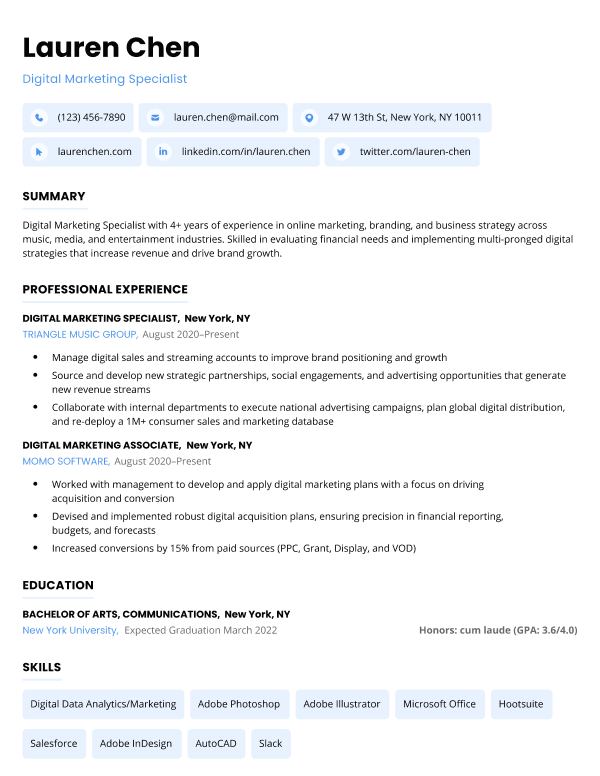
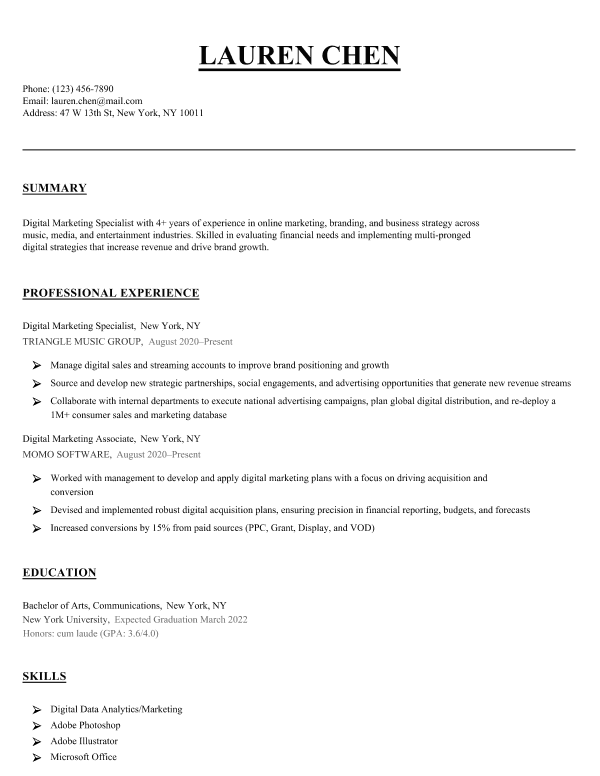
It’s best to avoid resume templates with complex graphics and other design elements that can confuse applicant tracking systems. Use a simple design to make sure the software can parse your information accurately, and always save your final file as a PDF to prevent the formatting errors common with .doc files.

About the Author

Lauren Mastroni is a Senior Digital Content Writer at Resume Genius, where she creates data-driven career content and actionable job search advice. With a background in academic research, she brings a research-focused approach to topics like resume writing, interviewing, and career development. Lauren is dedicated to helping job seekers at all stages navigate the hiring process and present themselves more effectively to employers.


Related Articles
Resume Help
Resume Examples for Jobs in 2026
Geoffrey Scott
Lauren Mastroni
Resume Help
6 Best Resume Paper Types (& How to Choose)
Ida Pettersson

Samuel Johns


Conrad Benz
Resume Help
How to Make a Resume for Any Job in 2026
Sebastian Morgan
Resume Help
Creative Resume TemplatesSebastian Morgan

Corissa Peterson