
• Skip to Content
  • Skip to Sidebar
  • Skip to Footer
Resume Genius home
  • View All Free Resume Templates
    Professional Designs
    • Basic
    • Creative
    • Modern
    • Minimalist
    File Types To Download
    • Word
    • Google Docs
    • PDF
    • Pages
    Formats
    • Chronological
    • Functional
    • Combination
    • Infographic
    Situational Templates
    • ATS
    • Entry Level
    • Picture
    • Blank

    Build your resume with a professional template

    Choose one of our ATS-friendly templates, pick your favorite layout and color, and apply for jobs within the app. Test it out today.

  • View All Resume Examples
    For Students
    • High School
    • Internship
    • College
    • Student CV
    By Experience
    • No Experience
    • Mid-Career
    • Manager
    • Executive
    Top Industries
    • Teaching
    • Nursing
    • Administrative Assistant
    • Customer Service
    • Cashier
    • Engineering
    • Graphic Design
    • Server

    Struggling to fill in your resume?

    Our builder's database of expert-written experience bullets plus AI-powered content suggestions transforms a blank page into a perfectly tailored resume. Try it now.

  • Visit the Genius Blog
    Tools
    • AI Resume Generator
    • ATS Resume Checker
    • Resume Summary Generator
    • Bullet Point Generator
    Resumes
    • How to Make a Resume for Any Job in 2026
    • The Best Resume Format for 2026
    • How to Put Skills on Your Resume
    • 40+ Professional Resume Summary Examples
    Cover Letters
    • Cover Letter Templates to Download
    • Cover Letter Examples for All Job Applications
    • How to Write a Cover Letter for a Job in 2026
    • Cover Letter Format: Template & Examples
    CVs
    • Professional CV Templates
    • 400+ CV Examples for Everyone
    • How to Write an Academic CV
    • CV Examples for Students

    Make a resume that stands out

    Our resume builder is powered by decades of industry expertise and the latest job-search tech. Get started now and give your application an edge.

    • The resume genius builder Make a professional resume in just a few minutes.
    • AI Cover Letter Generator Write custom cover letters for every application.
    • Professional CV Maker Create a detailed academic or professional CV.
    Read what our customers are saying about us 10 Best Resume Builders of 2026
  • Pricing
Login Build My Resume

Blog Resume Help How to Make a Resume

How to Make a Resume for Any Job in 2026

Headshot of Sebastian MorganWritten By Sebastian MorganSenior Content Writer & Certified Professional Resume Writer
Headshot of Conrad BenzReviewed By Conrad BenzContent Manager & Hiring Manager
Headshot of Sebastian Morgan

Sebastian Morgan

Senior Content Writer & Certified Professional Resume Writer

10 years of experienceCPRW

Seb is a Certified Professional Resume Writer with 10 years of combined experience in career counseling and editorial work. With a MA in International Communications from National Chengchi University (Taiwan),...

View Profile
Updated June 15, 2026
Make My Resume NowUpload Existing Resume
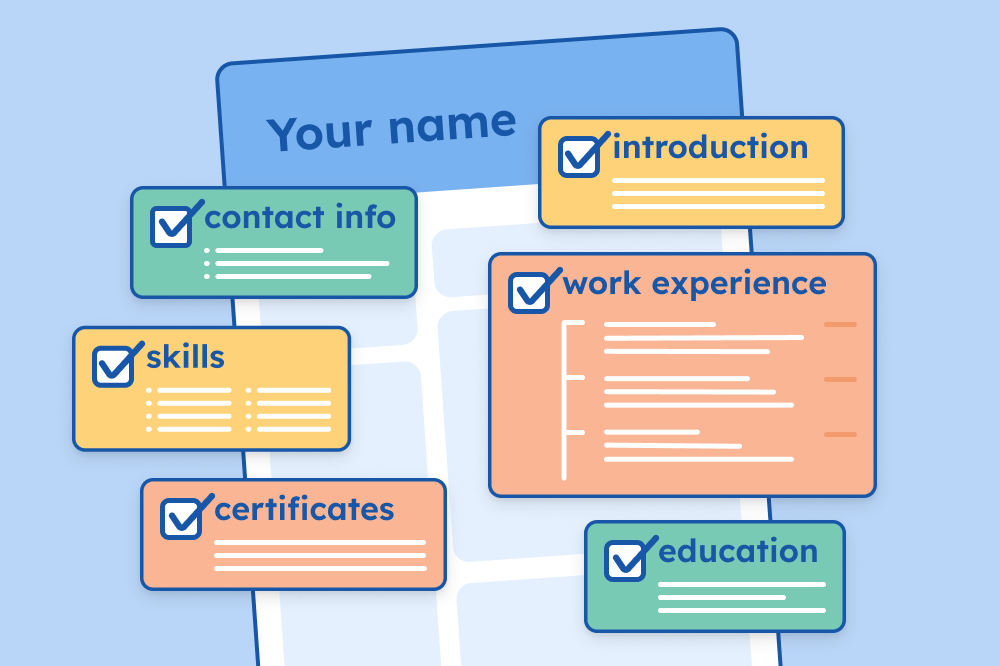
Illustration of a resume with all the necessary sections highlighted.
Table of Contents
  • How to Make a Resume for Any Job in 2026
    • 1. Download your resume template
    • 2. Determine which job you're applying to
    • 3. Lay out your relevant experience
      • How to structure each entry
      • How to write your bullet points
      • What to do if you don’t have work experience yet
    • 4. Write your resume summary
    • 5. Outline your education
    • 6. List your skills
      • Prioritize hard skills in your skills section
    • 7. Optimize your resume for HR software
      • How to keyword-optimize your resume for an ATS
    • 8. Check your work
    • Example resumes you can follow
      • Resume for a first job
      • College student resume
      • Experienced applicant resume
      • Senior-level resume
    • Frequently asked questions
      • Should I include references?
      • What is the fastest way to make a resume?
      • What should I name my resume file?
      • What else can I do to land a job more easily?
3 resume templates available in the Resume Genius builder with a banner explaining how quickly you can make a resume

Struggling to get interviews?

Make a professional resume

Share:

  • Copied

Here’s what you need to know to create a resume that actually works in 2026. Learn how to spot what employers want, fill out each resume section, and format your document for recruiters and applicant tracking systems.

A resume is a job application document that summarizes your skills and experience. It’s the most important document you submit when you apply for a job.

ViewsLikes
Our Expert:
Headshot of Sebastian MorganSebastian Morgan

In my role as a career coach and resume expert, I've spent the past five years helping people improve their resumes and I've reviewed hundreds along the way. I've seen what works — and what doesn't — and I know what the employer will be looking for when they open your application.

In this guide, I'll walk you through my writing process. You'll learn how to build a professional resume at any stage of your career by using an approach grounded in your skills and career goals — not generic formatting advice.

How to make a great resume for any role:
  1. Download our free template with every section you’ll need
  2. Determine which job you’re applying to and break down its requirements
  3. Lay out your relevant experience, focusing on achievements
  4. Write your resume summary around your most relevant accomplishments
  5. Outline your education concisely if experienced, in detail if starting your career
  6. List your skills to show technical expertise
  7. Optimize for HR software using keywords from the job post
  8. Check your work for hidden resume mistakes

You can use this guide to write a resume for 99% of jobs on the market. Academic jobs are the exception as hiring committees expect a different format. You should lay out your skills and experience using a CV template if you're pursuing a career in academia.

For every other position, from applying to your first job to a managerial role, this guide gives you a strong foundation for writing a successful resume.

1. Download your resume template

Start by downloading the template below. It's the most comprehensive option for beginners — it includes every section you might need, so you can delete what doesn't apply rather than build from scratch.

It uses a widely recognized resume format with clear headings, neat spacing, and a professional color scheme.

Download This Template

Use a Google Docs resume template if you prefer to edit your resume online.

The best templates prioritize simplicity and professionalism.

The design you pick should neatly fit all essential information on one page — the appropriate resume length for most job applicants.

Avoid template designs with complex graphics and images because these features cause errors in recruitment software. The data backs this up: in Resume Genius’s 2026 Hiring Insights Report, 53% of hiring managers point to plain, text-based PDFs and 43% to Word (.docx) files as the formats that scan most reliably.

Other professional resume templates

Don’t like the template above? We have a wide selection of additional free resume templates that you can download and edit.
More Free Templates

2. Determine which job you’re applying to

As a rule of thumb, build one base resume per job title, then lightly re-tailor it for each posting. Tailoring is now the expectation — 78% of hiring managers say resumes are better matched to specific postings than five years ago — but according to the 2026 Job Seeker Insights Report, job seekers rate it the single hardest part of updating a resume.

The easiest way to do that is to address the employer's needs. Match your skills and experience to the job description.

When you do this, your most relevant qualifications for each job naturally move to the front.

Begin by listing the key tasks and required skills from the job description. Include anything the employer highlights as a core expectation — particularly anything bulleted under "Key requirements" or "Main responsibilities."

For example, from the Digital Marketing Associate role below, pull out every point listed under "What You’ll Do."

Example job description:

Digital Marketing Associate
Content Locker

As a Digital Marketing Associate, you’ll play a key role in developing client campaigns, with a focus on web content, social media, and performance reporting. This is an ideal role for someone eager to learn agency-side marketing and build hands-on experience.

What You’ll Do

  • Assist with campaign planning and strategy.
  • Create engaging content for Instagram, LinkedIn, TikTok, and blogs.
  • Monitor campaign performance and prepare monthly analytics reports.

Once you have the employer’s requirements listed, line up any relevant achievements from your work, studies, or personal projects.

Try to include a clear measure of success wherever you can (e.g., “increased followers by 30%”). These details will help you write stronger bullet points later.

Using a simple table makes it easier to connect your skills to the job requirements. Here’s one that you can edit in Google Docs:

Free Resume Planner

ResponsibilitySkill/AchievementMeasure of Success
List daily tasks & main responsibilities as listed in the job descriptionLine up any relevant qualifications from your professional or academic backgroundNote any specific awards, grades, or metrics that give context to your success
Assist with campaign planningLed a successful campaign for a student startup competitionReceived student award (Holt Prize)
Create social media contentFreelanced as social media content creator on FiverrGreat client followers by 30% in 6 months
Prepare analytics reportsSolid understanding of Google AnalyticsCompleted GA4 Certification

Keep adding to your table until you’ve mapped all your relevant skills to the role. This becomes the foundation of your resume, and you'll refer back to it as you tailor your application to the specifics of each position.

3. Lay out your relevant experience

The best way to list your relevant experience is in reverse chronological order — start with your most recent job and work backward.

How to structure each entry

Work experience template

Job Title – Dates employed [month and year]
Company name – Company location [city and state]

  • Three to five bullet points describing your achievements and responsibilities
  • Include hard numbers when possible
  • Start each bullet point with an action verb

If you’ve been promoted, list each role separately to emphasize your career growth and success in previous roles:

Example work experience section

Technical Support Team Lead
May 20XX – Present | Seattle Community Center | Seattle, WA

  • Led a small support team, assigning daily tasks and monitoring service queue progress
  • Trained new volunteers on troubleshooting steps and customer service best practices
  • Oversaw complex repairs for community members

Technical Support Assistant
June 20XX – August 20XX | Tech Solutions Inc. | Seattle, WA

  • Provided first-line technical support to customers via phone, email, and chat
  • Resolved hardware and software issues, reducing average response time by 20%
  • Assisted in setting up and maintaining IT systems for office and remote employees

Don't worry about career gaps — more people have them than you think. It's easy to explain a gap in your cover letter, and you should only consider doing so if you stopped working for more than six months.

How to write your bullet points

Focus on achievements rather than responsibilities. Start each bullet with an action verb and name the tools and methods you used. Include the impact of your work where possible.

Quantify your achievements wherever possible — but don't force in a hard number for the sake of it. Hard numbers are only meaningful when your work can be easily measured:

Assisted 50 customers daily with purchases and returns

Implemented a content plan for Instagram that increased followers by 15,000 in two months

Remember that your bullet points are an opportunity to tailor your job to the target role, so choose accomplishments that reflect the job's skill requirements. The example below shows how different achievements can reflect different strengths.

Example experience bullet pointWhat it highlights
Provided personalized shopping assistance to 40+ customers per dayCustomer service
Organized inventory with high efficiency, completing tasks 10% faster than the team averageAttention to detail
Achieved an average of 140% of sales goals for three consecutive months.Sales performance
Maintain attractive merchandise displays, maximizing purchases through strategic product placementMarketing skills, customer-focus

It's often hard to think of what to write at first. Enter your job title in this bullet point generator to pull up a list of relevant achievements that you can personalize and add to your resume:

AI Resume Bullet Point Generator

Struggling to write your resume? Make clear, achievement-oriented bullet points for your resume in seconds with our free AI bullet point generator.

Job title Step 1 / 2
    List of resume bullet points Step 2 / 2
      Copy Text Copy Copied

      Use these work-experience bullet points to make a resume that lands you interviews.

      Build My Resume Now

      What to do if you don’t have work experience yet

      If you don't have full-time work experience yet, list any experience you have the same way you would for a full-time job. This works because employers increasingly weigh demonstrable skills over credentials.

      In our hiring survey, 86% of managers said they value relevant experience over formal education, 82% said certifications can be as valuable as a bachelor's degree, and 79% said self-taught skills or a strong portfolio can carry equal weight — so projects, coursework, and volunteer work genuinely count.

      Relevant experience could be any of the following:

      • Independent projects
      • Coursework
      • Volunteer work
      • Extracurricular activities
      • Internships

      If you genuinely have very little hands-on experience you can add, focus on your skills by writing a functional resume.

      Functional resumes follow a unique skills-focused structure that emphasizes what you know rather than what you've done. This layout is a good solution if you have less than six months of relevant experience. Otherwise, stick to the standard chronological resume format laid out in this guide.

      4. Write your resume summary

      Now that you've thought through which of your accomplishments are most relevant, highlight them in a summary at the top of the page.

      A resume summary is a short, 2–3 sentence statement that outlines your strongest skills and most relevant achievements for the job you're applying for. It's worth the effort: 90% of hiring managers say a clear summary helps them evaluate candidates faster.

      Don't write a general overview of your professional background. Instead, focus on what makes you a good fit for the job.

      Here's a simple template you can use to write your resume summary:

      Resume summary template

      [Job Title] with [# years of experience/a solid foundation] in [relevant industry]. Skilled in [skill 1], [skill 2], and [skill 3], with a strong track record of [measurable achievement, e.g., “delivering successful email marketing campaigns”]. Looking to apply my expertise to help [Company Name] [goal or outcome, e.g., “improve customer engagement and drive growth”].

      A short, results-focused summary puts your most relevant experience first in any field. You can also highlight your professional values or long-term goals if doing so strengthens your alignment with the employer.

      If you need some ideas, we have over 40 resume summary examples for different job titles — or you can also use the resume summary generator below.

      Generate a professional resume summary instantly, or use our AI-powered summary generator to customize your own in 2 minutes.

      question 1 1 of 9
      357 characters
      Copy Text Copy Copied

      What word best describes the type of job seeker you are?*

      No options
      • Senior
      • Executive
      • Mid-level
      • Veteran
      • Intermediate
      • Entry-level
      • Licensed
      • Qualified
      • Aspiring
      • Certified
      • Registered
      Describe your experience level

      What work environment are you looking to work in?

      No options
      • Company
      • Store
      • Organization
      • Establishment
      • Firm
      • Hospital
      • School
      • Precinct
      • Restaurant
      • Bank
      • Pharmacy
      • Dispensary
      • Bar
      • Gym
      • Center
      • Facility
      • Hotel
      • Clinic
      Select the best choice based on the job you’re applying for. If unsure leave it blank.

      What position are you applying for?*

      This field is required
      No options
        If you can’t find your job title, choose a similar title and adjust it at the end.

        How many years of experience do you have?*

        No experience? Put “0” in the ‘Experience’ field.

        What are your main responsibilities at work?*

        2
        No options
          Select the two options that best reflect your experience or interests.

          6. What word best describes you in your professional life?

          This field is required
          No options
          • Adaptable
          • Diligent
          • Detail-oriented
          • Efficient
          • Focused
          • Hard-working
          • Goal-oriented
          • Results-oriented
          • Proactive
          • Quality-oriented
          • Motivated
          • Reliable
          • Talented
          • Creative
          • Experienced
          • Loyal
          • Innovative
          • Curious
          • Versatile
          • Diverse
          • Extroverted
          • Modest
          Choose one word that reflects your personality on the job.

          7. Which soft skills would your peers and/or clients praise you for?

          2
          No options
          Choose two of your top soft skills

          What are your top professional skills?*

          2
          No options
            Choose two of your most valuable professional skills.

            Do you have any relevant licenses or certifications?

            Add your most relevant license or certification. If unsure leave it blank.
            Done
            input
            • Experience Level: Loading…
            • Target Work Environment: Loading…
            • Target Position: Loading…
            • Years of Experience: Loading…
            • Current Responsibilities: Loading…
            • Professional Identity: Loading…
            • Top Soft Skills: Loading…
            • Top Professional Skills: Loading…
            • License/Certification: Loading…
            Hello and welcome!
            0 characters
            Copy Text Copy Copied
            Powered by

            5. Outline your education

            If you already have a few years of work experience, your education section should be brief and focused. It should list your highest level of education, whether that’s a postgraduate degree, college degree, or high school diploma.

            Many jobs have formal education requirements, and employers often use applicant tracking systems (ATS) to filter resumes by education level, so including this detail is vital.

            Here’s how to format an education entry:

            Education section template

            Degree name
            School name and location – Graduation year

            • GPA (if above 3.5)
            • Latin honors

            You should add more detail to your education section if you are still studying or have less than two years of relevant experience.

            For example, you can include relevant coursework or academic achievements and honors.

            As with every part of your resume, be selective and include only what strengthens your application — especially if you already have work experience.

            Do
            • List your most recent qualification first. Work backward from your latest degree or certification
            • Include key details: institution, qualification, subject, and completion year
            • Add honors, awards, or relevant coursework if they strengthen your application
            • Keep entries relevant to your target role
            • Group similar qualifications (e.g., “Professional Certifications” or “Postgraduate Studies”) to avoid clutter
            Don’t
            • List every course you’ve taken. Focus on the most relevant or advanced ones
            • Mention high school once you have a college degree or higher
            • Exaggerate qualifications
            • Duplicate entries. If you earned multiple credentials from the same provider, combine them clearly

            6. List your skills

            A good skills section shows the employer exactly what you specialize in. Keep it concise. A short bulleted list of up to 10 skills is ideal. A dedicated skills section isn't optional in most employers' eyes — 85% say they expect every resume to include one.

            These skills should highlight your relevant expertise and show why you're a closer match than other candidates.

            If you've researched the role and identified your unique selling point, you should already have a good sense of what to include here.

            Here are some good types of skills to highlight in your skills section:

            • Tools and software (e.g., Python, Adobe Photoshop)
            • Industry or market knowledge (e.g., social media marketing)
            • Certifications or licenses (if you haven’t included a separate certifications section)

            Prioritize hard skills in your skills section

            Your skills list should make sense to the employer at a glance. Some resume skills, often soft skills like “communication,” appear too vague when listed alone.

            Generally, list standalone hard skills like languages or specific software in the skills section. Soft skills should be demonstrated in your work experience bullet points, cover letter, or later on in an interview.

            However, if you’re applying to a job where soft skills play a large part, you can list relevant soft skills in the skills section. For example, listing “people skills” or “team player” on your customer service resume will emphasize your strength in interpersonal communication.

            The best skills to list depend on your target job title. Use this skills generator to find skills tailored to your position:

            AI Resume Skills Generator

            Make a high-impact skills section for your resume in seconds with our free software. Simply enter your job title and you’ll be matched with the most impactful skills for your industry.

            Job title Step 1 / 2
              List of resume skills Step 2 / 2
                Copy Text Copy Copied

                Use these job-specific skills to make a resume that lands you interviews.

                Build My Resume Now

                7. Optimize your resume for HR software

                For your resume to be competitive, it needs to be machine-readable and keyword-optimized. This matters because 71% of hiring managers screen with an ATS, and the top reasons resumes get filtered out are missing or misaligned skills (42%) and a lack of relevant keywords (28%) — both fixable by matching the job description.

                If you've used an ATS-ready resume template — like the one at the top of this article — then your resume will scan easily into HR software.

                Your resume also needs accurate keywords. Keyword-optimized resumes are more likely to score highly on an ATS — and employers are more likely to prioritize high-scoring resumes when reviewing applications manually.

                This is also where you can spread the net wider. Build one base resume per job title, then lightly re-tailor it for each posting. Applying to the same role at several companies? Keep the structure and swap in the exact tools, metrics, and terms each job post uses — employers rank closer keyword matches higher.

                You can upload your resume to our free ATS resume parser tool to preview your score and identify any hidden opportunities for improvement:

                Drop your resume here or choose a file.
                Uploading…
                0%
                DOC, DOCX, PDF, HTML, RTF, TXT (Max 5MB)

                How to keyword-optimize your resume for an ATS

                If your resume is scoring poorly for keyword match, return to the job description and review the skills, qualifications, and responsibilities the employer is looking for.

                You should be using exact matches for any key terminology, particularly the following details:

                • Names of tools and software
                • Performance metrics
                • Specialized tasks and processes
                • Experience requirements (in years)
                • Degree and certification requirements

                When adding keywords to your resume, being thoughtful about their use is important. Your skills section is usually the easiest place to highlight technical skills-focused keywords.However, if the keyword needs context, try to include it in a relevant example in your work experience section.

                Here's a good example of an optimized achievement with the keywords in bold:

                Lifted subscription rate by 34% in six months by overhauling email marketing segmentation and automation in Mailchimp, driving higher opt-ins from content upgrades

                8. Check your work

                Before you submit your resume, give your writing a final quality check. Mistakes are easy to miss — especially when you've been working on the same document for a long time.

                You can use this checklist to review your resume manually:

                The Resume Genius Resume Checklist

                Email address is professional – for example, firstname.lastname@email.com

                No headshots or sensitive personal details included

                Fits on one page (or two pages if you’re experienced)

                Easy to read – appropriate font, size 10–12 pt, clear spacing

                Design is appropriate for the position you’re applying for

                Includes essential resume sections (e.g., experience, education, skills)

                Quantifies achievements with numbers in the work experience section

                Uses action verbs throughout

                Addresses the requirements listed in the job ad

                No typos or grammatical errors

                Clear formatting with appropriate spacing and logical structure

                Double check your summary and work experience section. You'll have edited these sections heavily at this point — errors can easily creep in when you're focusing on including the right keywords and highlighting your impact.

                Common Resume Writing Mistakes

                MistakesDon’t WriteDo Write
                Using personal pronounsI trained…Trained…
                Forgetting apostrophes5+ years experience5+ years’ experience
                Relying on weak verbsDid (tasks)Performed, carried out, executed
                Being unclear about the results of your actions Increased software efficiency by 30%Reduced software load times by 30%
                Bragging and complainingOvercame inefficient management to…Succeeded in…
                Not showing initiativeWas in charge ofManaged, oversaw, supervised

                Example resumes you can follow

                You can follow the steps above to write a great resume at any stage of your career.

                Below are four resume examples that show what clear, well-written resumes look like for different experience levels.

                Check resume examples for specific jobs to make sure you’ve used the right professional terminology throughout your document.

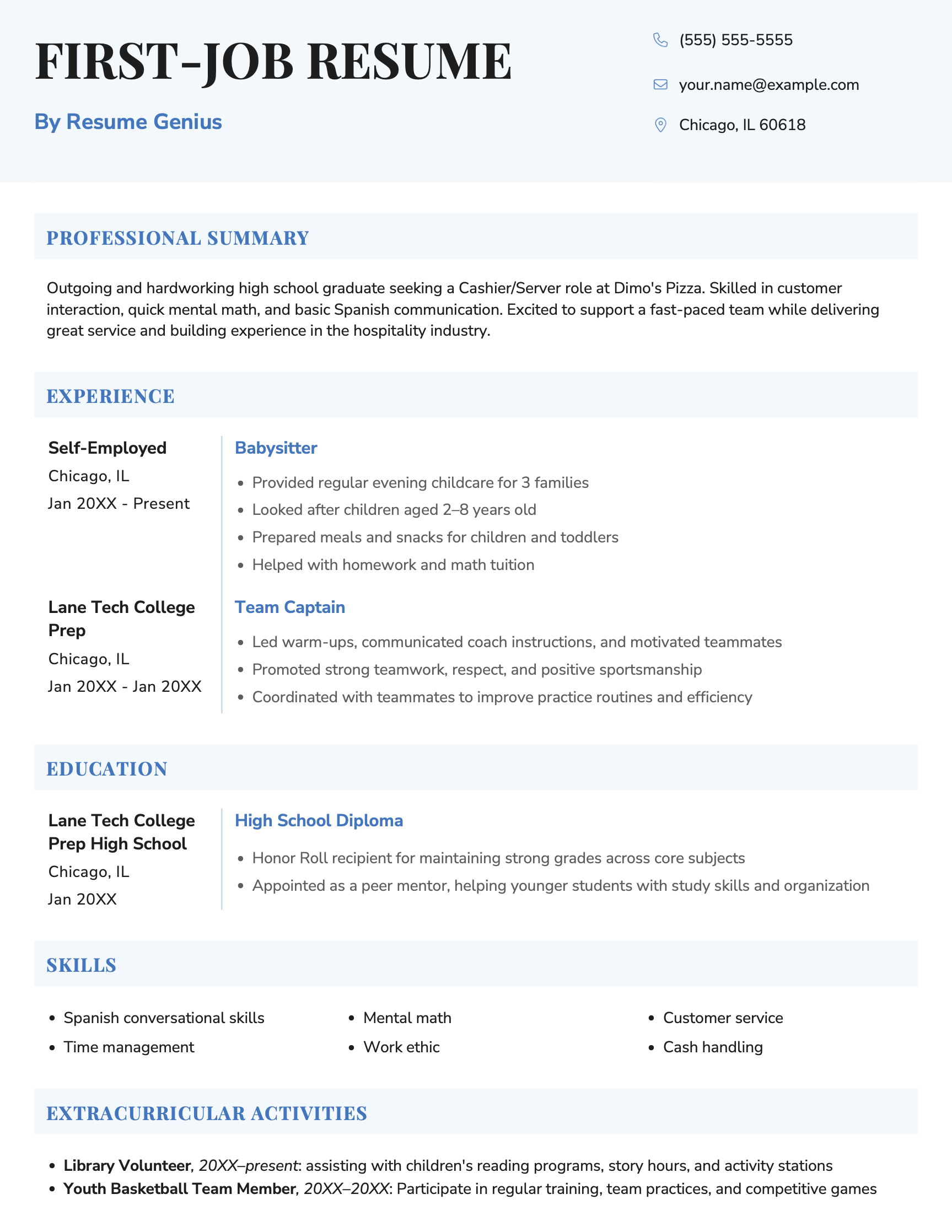
                Resume for a first job

                This sample shows how to write a resume with no formal work experience — and no college degree.

                The applicant builds credibility by highlighting academic achievements, extracurriculars, and core skills.

                Example of how to write a resume for your first job.
                Build My Resume

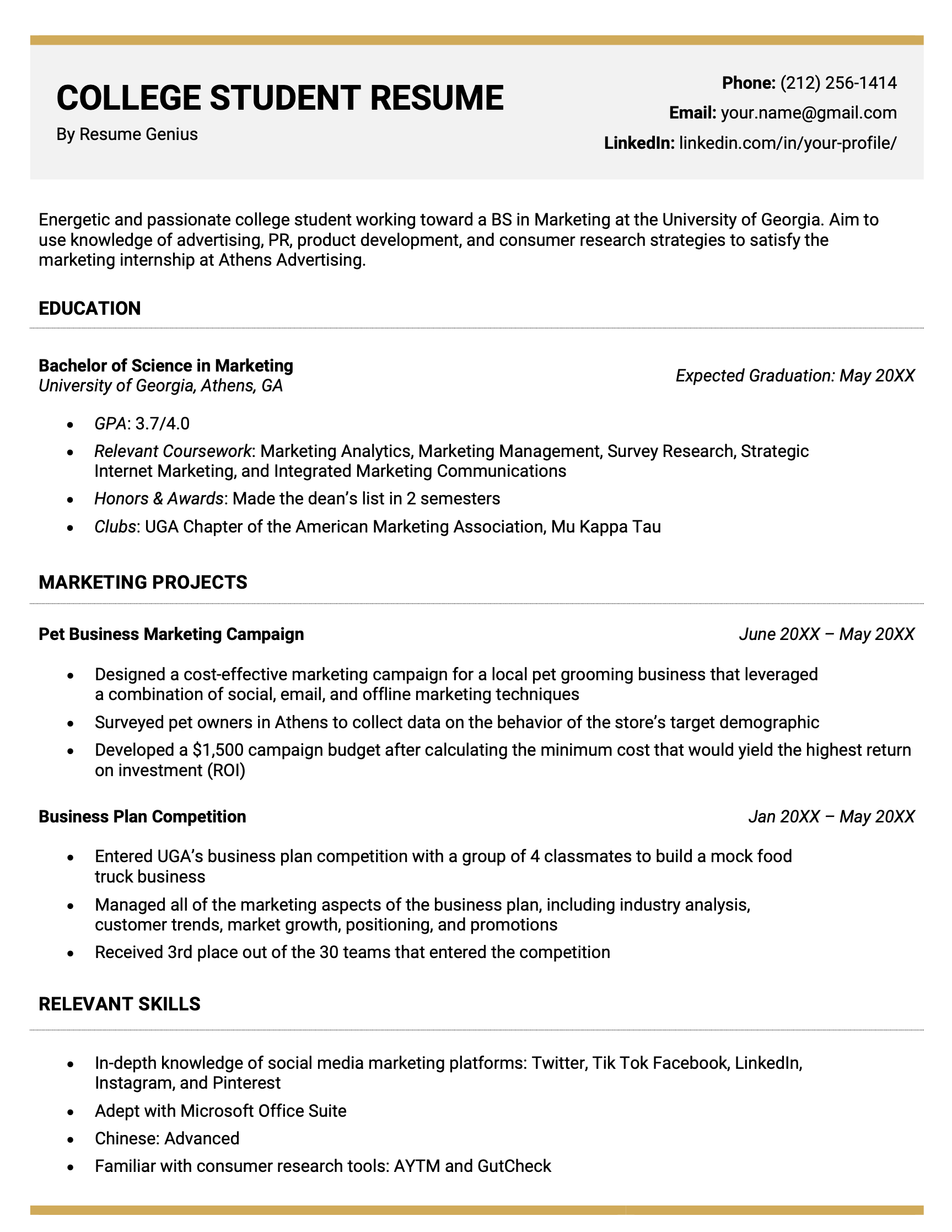
                College student resume

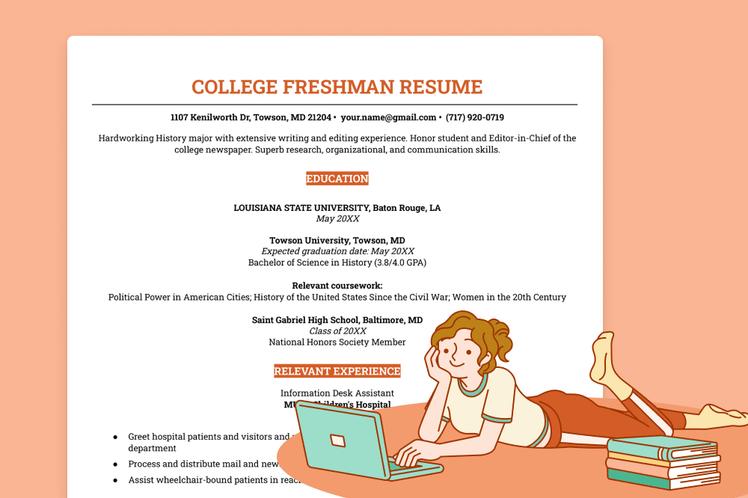
                This college student resume shows how to structure an application for an internship or graduate job.

                The detailed education section shows that the applicant has a strong foundation in their field, while the internship entry highlights relevant achievements.

                An example of how to write a resume as a college student.
                Build My Resume

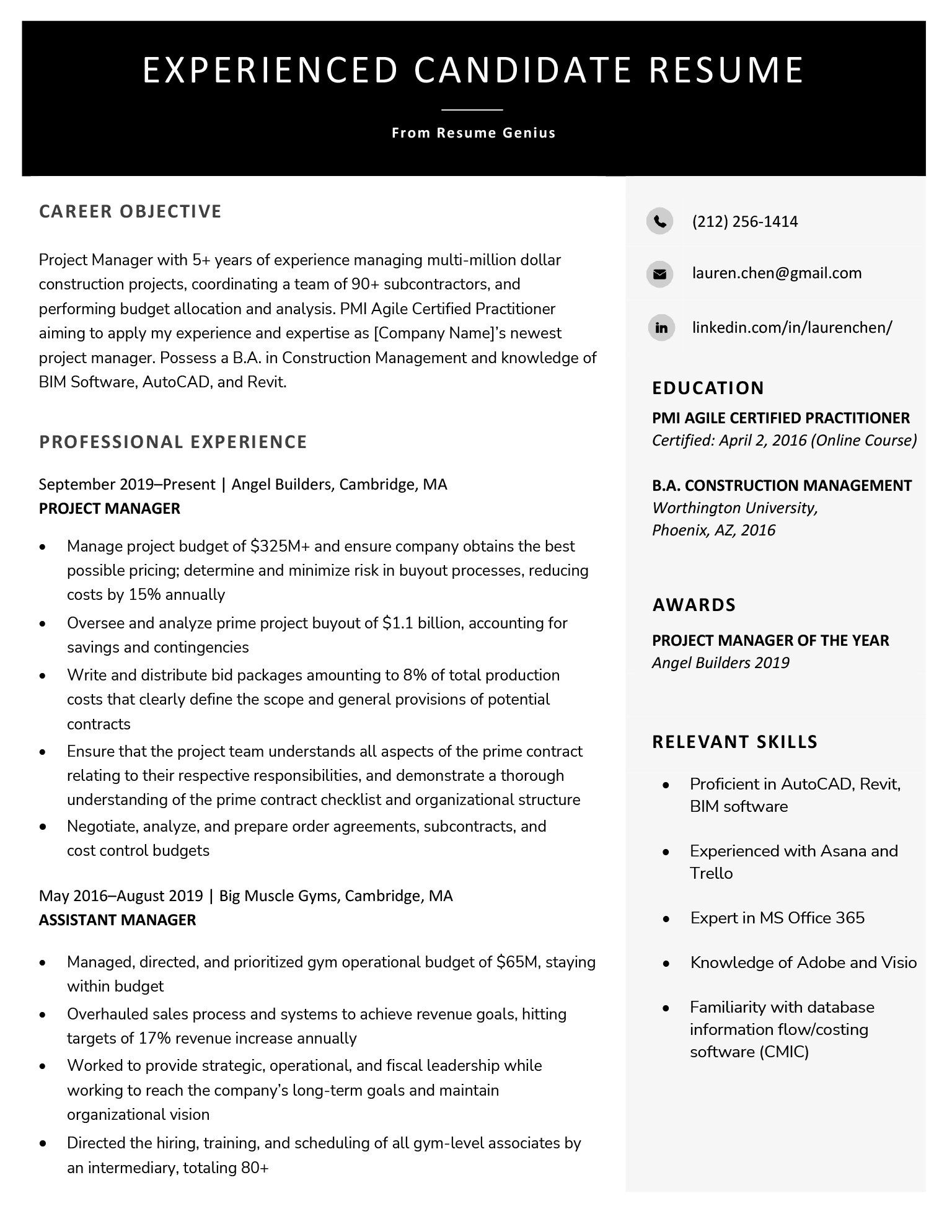
                Experienced applicant resume

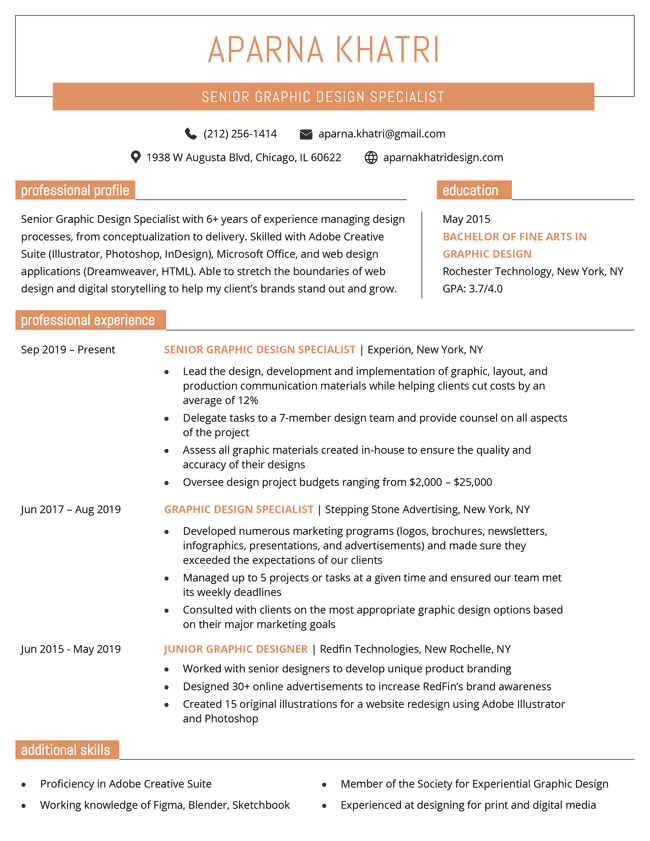
                Because this applicant has several years of experience in their target industry, they emphasize clear career growth and measurable achievements.

                An example of resume on a simple black, white, and gray template that demonstrates the candidate's five years of work experience
                Build My Resume

                Senior-level resume

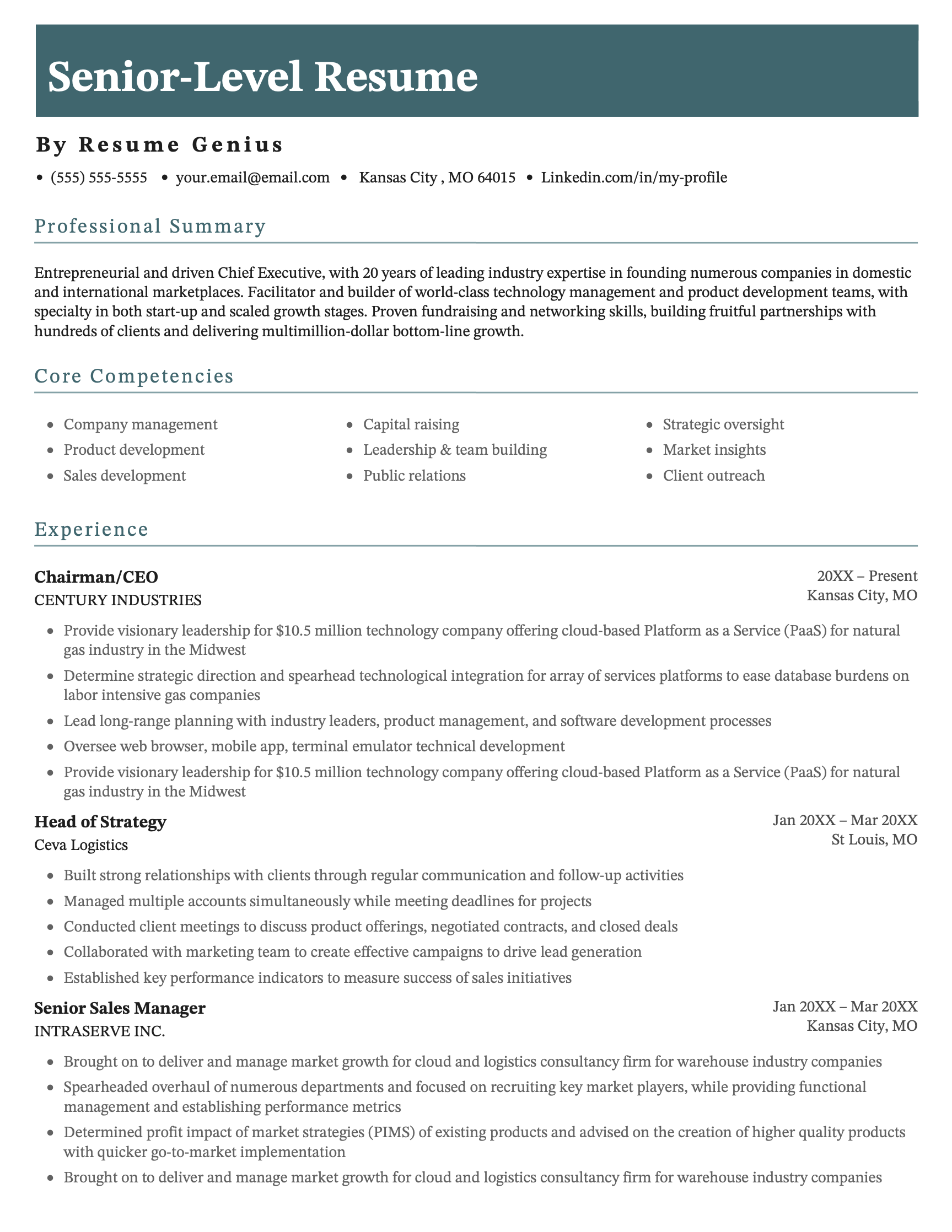
                This multi-page resume covers decades of experience. Key achievements, competencies, and leadership skills are summarized on the first page to give recruiters an immediate, high-level overview of the candidate.

                Example of a senior level resume written by a chief executive with 20 years of experience.
                Build My Resume

                Frequently asked questions

                Here are some answers to common questions about writing a resume:

                Should I include references?

                No, you shouldn’t include references on your resume. While people used to do this, it’s no longer considered necessary because employers will reach out to you later in the hiring process if they want to hear from your references.

                Including a reference section on your resume just uses up valuable space that would be better used elaborating on your achievements and skills.
                What is the fastest way to make a resume?

                The fastest way to make an accurate resume that doesn't trigger AI alarm bells is by using a professional resume builder.

                The best resume builders make resumes around your skills and achievements by guiding you through each resume section and giving you control over what information is added.

                It's also possible to make a ChatGPT resume, but watch out for AI-generated phrasing and inaccurate statements. You don't want to unintentionally lie to an employer.

                What should I name my resume file?

                You should name your resume file “First-Name-Last-Name-Target-Job-Title-Resume.” For example, “Robin-Walker-Marketing-Assistant-Resume.pdf” would be a good resume file name.

                Using your full name and the job title separated by dashes or underscores makes your resume file immediately identifiable to the hiring manager, who may receive hundreds of applications.

                What else can I do to land a job more easily?

                For a truly well-rounded view of who you are as a candidate as part of a persuasive application, you also need to write a cover letter that links your strengths and values to the specific employer.

                Even when a cover letter isn’t explicitly required, writing one is worth it. Cover letters show professionalism and enthusiasm. If that isn’t enough to convince you, 94% of hiring managers say cover letters influence their recruitment decisions.

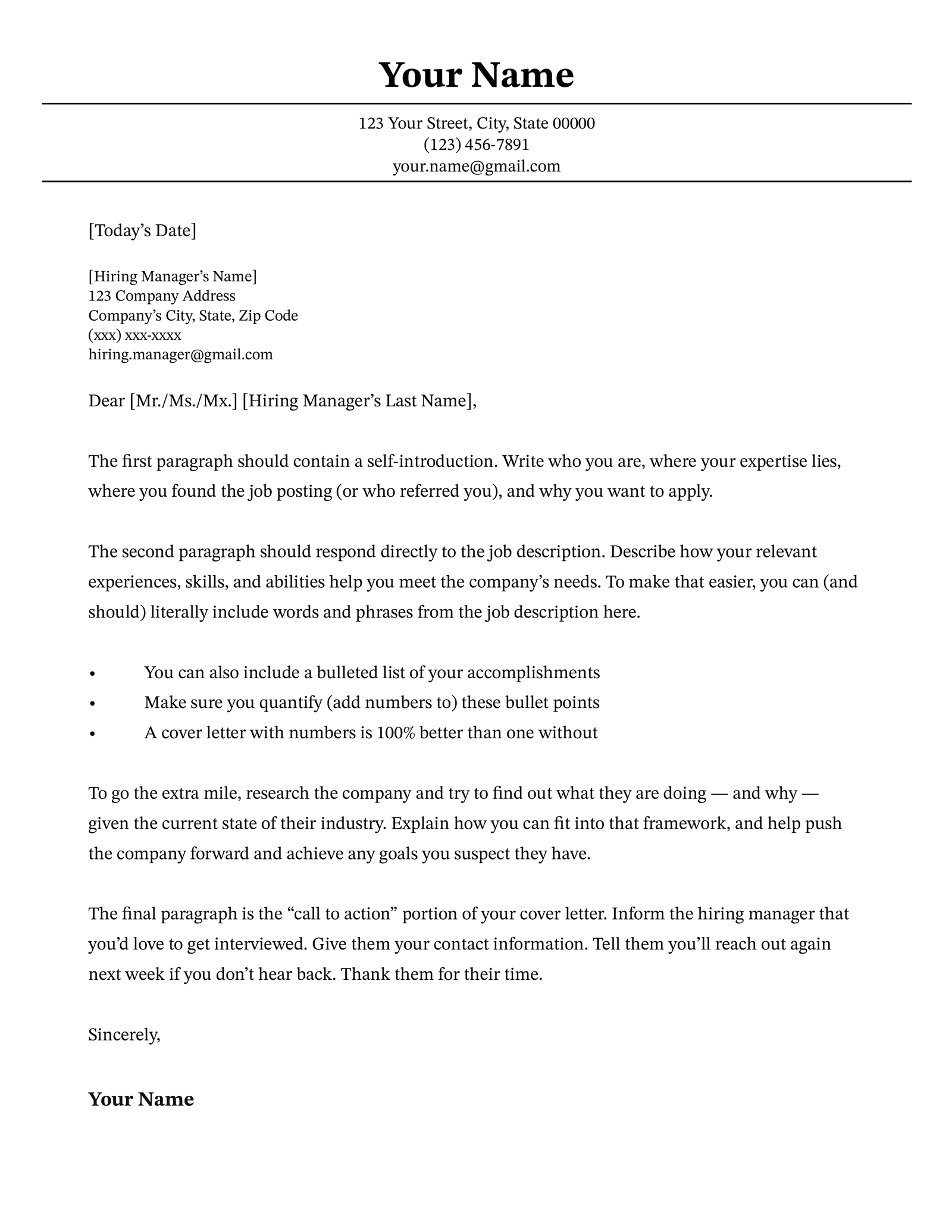
                You can quickly make your cover letter with AI or fill out the cover letter template below:

                A free downloadable cover letter template.
                Write My Cover Letter

                Find more cover letter templates in our download library.

                Write your resume fast

                Our AI-powered resume builder helps you write an effective resume in minutes. Just choose your favorite template and our software will guide you through each step.
                Write my resume

                About the Author

                Headshot of Sebastian Morgan
                Sebastian Morgan
                Senior Content Writer & Certified Professional Resume Writer
                10Years of Experience
                144Articles Written
                8Articles Reviewed

                Seb is a Certified Professional Resume Writer with 10 years of combined experience in career counseling and editorial work. With a MA in International Communications from National Chengchi University (Taiwan), he helps job seekers translate their experience into employer-ready applications for global job markets.

                Certifications
                Certified Professional Resume Writer (CPRW)
                Published In
                Employee Benefit News 360 Learning The Vector Impact
                Expertise
                Resume WritingJob Market ResearchFact Checking & Editing Job Application PreparationInterview Coaching
                LinkedInLinkedInMuck RackMuck Rack
                View Profile
                Table of Contents

                Related Articles

                Resume Help

                Resume Examples for Jobs in 2026
                Headshot of Geoffrey Scott, Senior Manager and Certified Professional Resume Writer at Resume Genius (the smartest online resume builder)

                Geoffrey Scott

                March 23, 2026

                Resume Help

                How to Make or Improve Your Resume Using ChatGPT
                Lauren Mastroni, a staff writer at Resume Genius

                Lauren Mastroni

                April 16, 2026

                Resume Help

                6 Best Resume Paper Types (& How to Choose)
                Headshot of Ida Petterson

                Ida Pettersson

                March 30, 2026

                Resume Help

                17 Most Common Resume Mistakes You Need to Avoid
                Headshot of Sam Johns, CPRW

                Samuel Johns

                April 13, 2026

                Resume Help

                Creative Resume Templates
                Headshot of Sebastian Morgan

                Sebastian Morgan

                September 15, 2026

                Resume Help

                10 Best Resume Builder Websites & Apps in 2026
                Headshot of Conrad Benz

                Conrad Benz

                June 21, 2026

                Resume Help

                College Freshman Resume Examples and Writing Tips
                Headshot of Corissa Peterson

                Corissa Peterson

                August 26, 2026

                Resume Help

                Modern Resume Templates
                Headshot of Sebastian Morgan

                Sebastian Morgan

                September 15, 2026
                Resume Genius
                Linkedin Instagram Youtube Facebook Twitter Tiktok Pinterest Reddit Giphy
                RESUMES
                • Resume Builder
                • Resume Templates
                • ATS Resume Checker
                • AI Resume Generator
                • Resume Summary Generator
                • Resume Bullet Point Generator
                • Resume Skills Generator
                • Resume Parser
                • Resume Examples
                • How to Make a Resume
                COVER LETTERS
                • Cover Letter Generator
                • Cover Letter Templates
                • Cover Letter Examples
                • How to Write a Cover Letter
                • Cover Letter Format
                CVS
                • CV Maker
                • CV Templates
                • How to Write a CV
                • CV Examples
                • CV vs Resume
                POLICIES
                • Terms & Conditions
                • Privacy Policy
                • CCPA/GDPR
                • Accessibility
                • Editorial Guidelines
                ADDITIONAL RESOURCES
                • About Us
                • Career Experts Program
                • Join Our Team
                • Press & Media Mentions
                • Pricing
                • Product Reviews
                • The Genius Blog
                SUPPORT
                • Help & Support
                • Contact Us
                • Forgot Password
                • Frequently Asked Questions
                Certified professional resume writer official seal
                4.6 / 5 4.5 stars Trustpilot
                4.5 / 5 SmartCustomer
                Add Resume Genius as a preferred source on Google
                support@resumegenius.com (866) 215-9048 [Monday – Friday: 8:00 AM – 7:00 PM (EDT)] [Saturday – Sunday: Closed]

                © 2026, Sonaga Tech Limited. All rights reserved

                ResumeGenius.com is owned and operated by Sonaga Tech Limited, Hamilton, Zweigniederlassung Luzern with offices in Luzern Switzerland.

                Your review would mean a lot to us.

                We hope our free downloadable resources will help you on your path to career success. If you have time, a quick review would really make our day (it'll only take 15 seconds). Best of luck on the job hunt!

                Leave A Review